

As a parent, time management is crucial. With a busy family life, it can be challenging to balance work, household tasks, and quality time with your children. In this story, we speak with Lina, a fashion designer and a mom from Mumbai, to learn her top tips and how she uses time blocking for managing time effectively.
Tell us about yourself
Hello! I am Lina Shah. I am a fashion designer and a mom to an 8 year old boy. I design apparel for parents and kids for various occasions like baby showers, anniversaries, birthdays, etc. We live in Mumbai and my child goes to Oberoi International School. “If you look at what you have in life, you’ll always have more. If you look at what you don’t have in life, you’ll never have enough.” -Oprah Winfrey

What does your typical day look like?
My day starts early at 5:30 am. I then drop my son to school which is 45 mins away. While coming back, I plan my day, order groceries online or schedule any pending appointments. As a parent, every minute counts. Once I come back, I go to the gym without fail.This helps me stay focused, maintain good health, improve as a person, and effectively manage all my relationships and commitments, exceeding 100% effort. I then start with my work and cater to client requests on designs, events and interface with vendors for various projects I am working on. I had taken a break for a few years when my son was young and now I am back to my work and love what I am doing. As the day progresses and work gets done, it’s time to pick up my son from school and on our way back we have activities and classes planned for him. To manage my time efficiently with all the above tasks, I use the time blocking technique

What activities or hobbies is your son currently pursuing?
He is currently pursuing these:
- Tennis – It’s been 6 months since he has started this and we have been working with individual coaches at MCA and Matunga Gymkhana.
- Swimming – He loves this and is actually at an advanced level. We practice at Matunga Gymkhana.
- Robotics – We have been doing this for 3 years and it started with Lego projects. Now we do advanced robotics with Niti at Juhu.
- Horse Riding – My son has picked this up recently and loves it. We pursue this at Mahalaxmi race course. Can you add video 1 here?
How do you currently manage your priorities and what are the drawbacks with this approach?
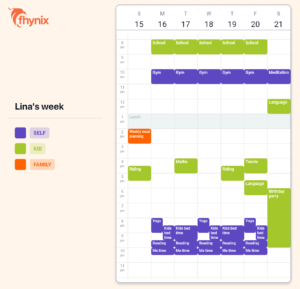
As you can see my schedule is not blocked continuously from 9 am – 5 pm, but split across the day. I wasn’t very organized earlier and kept a diary and a lot of things in my head. As a result, I missed some tasks, felt overwhelmed when unexpected events occurred, and became frustrated when trying to coordinate my children’s schedules and activities with my own. Hence I searched for time management apps for parents but nothing was available that was easy, more than just a calendar and most importantly an ally who was genuinely interested in making my life better.
How does Fhynix help you manage things?
- I have been using it for more than 2 months now. It started off as helping a friend to figure out the use cases and provide feedback 🙂 But now I have started incorporating it into my schedule and it is becoming a habit for me. It reflects my personality and priorities and is an extension of who I am.
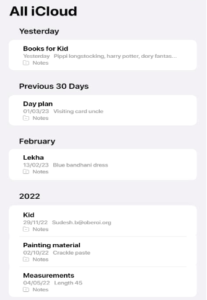
- Before Fhynix – I used apple notes for to-do’s but not so much as to organize my schedule. I used to keep a lot of things in my mind. You can see how my calendar looked earlier
After Fhynix:
- For organization: My current calendar has color coded events. This helps me to get reminded and also find empty slots to pick more things – all in one place. Here you can see it is well-balanced with self priorities, family commitments and kids schedules across classes and school to-dos.
- For event discovery: I got to know about the Little Flea event in Bandra through the hyperlocal event suggestions from Fhynix. Mostly parents get aware of these via whatsapp groups and facebook communities. But Fhynix curates events and activities across communities and bypasses the local maxima. It also aligns these recommendations to my interests based on my current events and onboarding. So they are hyper contextual.
One feature you like about Fhynix?
- Creating a kid’s planner: I add my kid’s classes like art, tennis which are recurring events so I can see everything on one screen. If I add more classes, I can easily see which slots are available and what is not coinciding with birthday parties, school or family trips. This helps me to not double book and also create a more balanced schedule of classes, academics and free-play.
- Easy to create and edit events: With Fhynix, I can quickly create an event such as doctor’s appointment or a birthday party and assign a tag (kid, self, home, work, etc). This is shown in a color-coded manner on the calendar; making it easy to see events for various categories. Drag and edit is very helpful too.
- Timely and contextual reminders: Once an event is added, I get reminders 2 days and 5 days in advance so I can plan accordingly. For eg: if there is a birthday party, I get a reminder 5 days in advance to buy a gift! I also get a reminder 10 mins in advance which helps for recurring events or when I am in the middle of something.
Based on your learnings as a parent, how can we make Fhynix helpful to more parents?
One thing would be Information discovery. The app has great recommendations and I am actually a pro at finding kids’ classes 🙂 I use whatsapp groups, talk to multiple parents from the same and multiple schools, instagram, facebook and much more! We all waste time doing our research and some might have already done it before. It would be nice to add my learnings in the app and not compromise on quality at the same time, so others can learn from my research and the time I have invested in this.
3 tips for parents based on your experience
- Open communication – In today’s world, kids have access to a lot of information. It is important to be aware of what’s happening in their lives and always have honest chats with them on how they are feeling, their concerns, their likes/dislikes and also upskill yourself on topics that matter to them.
- Learn and Unlearn – Parenting is one of the oldest jobs. There is no manual for it and no one can prepare you for it. You will have to keep an open mind, learn and also ignore what doesn’t appeal to you.
- Be their biggest cheerleader: Every child is different and so is every parent. Understanding our kid’s strengths and motivating them to do their best without putting undue pressure is tricky. We all are learning the fine balance here – but something we should be cognizant of
Can you share one hack that has worked for you?
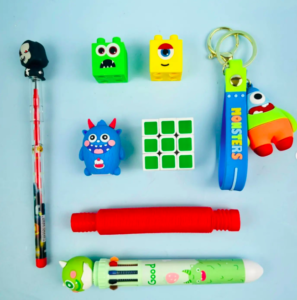
I usually buy birthday gifts in bulk. This helps me to not re-package unopened existing gifts, helps me focus on things that are age-appropriate and environment-friendly and gives me an opportunity to create an annual theme with my son and teach him a core value.I highly recommend this vendor.
Fhynix is your go-to time blocking app. Can you elaborate on that?
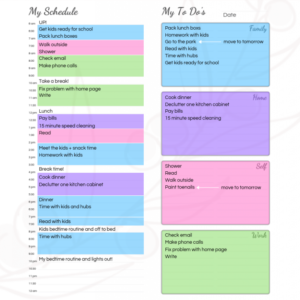
I use the famous time blocking framework to get tasks done. This is used by famous entrepreneurs like Elon Musk and Bill Gates. As Cal Newport says “ A 40 hour time-blocked work week, I estimate, produces the same amount of output as a 60+ hour work week pursued without structure.” Time blocking involves dividing your day into blocks of time and dedicating tasks to those blocks. The length of the blocks depend on the time it takes to complete the task. This technique helps get things done in their assigned time and not procrastinate. Here’s an example of time blocking:
What is one recent achievement of yours that you would like to share to motivate parents
Before my son, I used to hear people talking about life being just dedicated to kids with no time for yourself. I had that phase too. But over the last few years, I have learnt to prioritize my happiness, mykid’s priorities, family and social commitments and I feel I am a better version of myself. It is not easy, but ruthless prioritization and focusing on the positives has helped me come a long way. I do time blocking to plan meditation, yoga, gym and also spend time on my work, kid and family which makes me have a balanced lifestyle.
What apps do you use and why
- Instagram – For local information and trends, it helps me keep updated on classes, events, fashion, etc
- Zepto – I use it for a lot of things and it helps busy parents like me handle last minute changes
- Urbanic – This is one app I have recently started buying from. Very chic and trendy and no run-of-the-mill designs
- Luxury Escape – We use this quite often to travel with family and friends. They have great niche hotels and the experiences are great when traveling with kids and friends.
- Pinterest – I create boards on what matters to me and refer during kid’s school projects, birthday themes, cakes, house parties, DIY summer projects, etc
- Fhynix: I use Fhynix to manage my schedule, mentioned above and to organize my day and week. The timely reminders help me to remember school to-dos, dress up days and also get contextual suggestions for what’s coming up – return gifts for an upcoming birthday, summer camps, etc
Can you share 5 handles your follow so we can tag them
- Fashion – StudioVerandah – I love their conscious fashion value proposition and their clothing line. Have been following them for years. LittleTagsLuxury is amazing too!
- Parenting – MamandPeaches – This is a great handle for ideas on kids items – clothing, furniture, recipes, holiday destinations, etc
- Motivation – SudhaMurthy – This is my go-to page for daily inspiration on quotes on finding happiness in small things. Love the simplicity here.
- Travel – LuxSutra – This is a cool handle I follow for great vacations. It also has suggestions on travel tips with kids.





Three qualities you would like to see in you child as he grows up
- Be strong: I want my son to focus on health – mental and physical. A strong body and mind is key to long term happiness and success and I would like him to respect and focus on these from an early stage.
- Never give up: The ability to focus on effort vs outcome is something I would love him to understand.
- Learn and unlearn: In today’s fast changing world, the more you learn, the more there is to learn. A learning mindset will take him far in anything he chooses in life – sports, career
What would you like to do more
I would love to run an orphanage for kids and give free education, food and shelter. I am a big believer in this cause and currently we support: https://balashatrust.org/
We asked Lina’s friends to describe Lina
My friends are my sounding board.Excited to hear what they have to say 🙂
- “Lina, you are someone who is kind and very insightful. We met each other through the kids and are now great friends. You are always one step ahead and really care for your friends.” – Jyostsana, Business Partnerships.
- “Lina is someone you can reach out to for anything and she is very happy to help out. I have known her for 4 years now and she is very helpful and genuine. Also a very hands-on mom and has been a power user of Fhynix for months now!” – Almitra, Fhynix founder.

One thought on “Time Blocking to improve productivity”