If your school life currently feels like a cycle of forgotten assignments, late-night cramming, scattered notes, and constantly switching between WhatsApp, Google Calendar, sticky notes, and random screenshots — you are not alone.
Students in 2026 are dealing with more distractions, more digital tools, and more academic pressure than ever before. Between school, coaching classes, sports, entrance exam prep, extracurriculars, social media, and screen fatigue, staying organized has become harder than simply “using a planner.” That’s why study planner apps have exploded in popularity.
Before we proceed, do check our comprehensive guide on Daily Routine for Students and how to use AI and productivity to excel at studies. It covers more details on:
- How to use AI to build a smart study schedule
- 5 Frameworks on How Students can manage their time effectively
- Best time blocking app for student to study better
- <Video>5 Habits that can Transform College Life
Now, back to study planner apps and problems with most of them.
Most study planner apps are either:
- Too complicated
- Too corporate
- Too manual
- Too focused on productivity aesthetics instead of actual consistency
- Or simply not built for how students really behave
The best study planner apps today are not just calendars.
They combine:
- AI
- reminders
- routines
- focus systems
- habit tracking
- scheduling
- mobile-first workflows
- and emotional accountability
In this guide, we tested and researched the best study planner apps in 2026 for students, college learners, exam preparation, ADHD-friendly planning, and long-term consistency.
We’ll cover, best study planner apps for:
- School students
- College students
- ADHD productivity
- Exam preparation
- AI-powered scheduling
- Routine building
How We Tested These Study Planner Apps
We evaluated these apps based on:
- Setup friction
- Reminder effectiveness
- AI functionality
- Mobile usability
- ADHD friendliness
- Long-term consistency
- Student-focused workflows
Instead of simply comparing feature lists, we focused on how students actually behave in real life. Here is is how a realistic daily routine looks like for students and a video on how you can be intentional with your routine and succeed.
Many productivity apps look impressive initially but fail because:
- they require too much setup
- reminders become easy to ignore
- workflows become overwhelming
- students stop using them after a few weeks
The apps below were selected because they solve real student problems, not just productivity aesthetics.
What Makes a Great Study Planner App in 2026?
A lot has changed in the last few years.
Students no longer want:
- rigid planners
- desktop-heavy tools
- complicated setup
- endless manual task management
The best apps now focus on:
1. Mobile-first workflows
Students live on their phones. A planner must feel natural on mobile.
2. Quick capture
The fastest apps let you add tasks via:
- text
- voice notes
- screenshots
- AI parsing
3. Reminder systems
The biggest problem is not planning.
It’s remembering.
4. Low-friction organization
Students do not want to spend 45 minutes “setting up productivity systems.”
5. AI assistance
AI can now:
- organize schedules
- break down study sessions
- create routines
- prioritize work
- reduce overwhelm
6. Emotional accountability
The best planner apps reduce stress.
They should make students feel calmer and more in control.
Best Study Planner Apps Comparison Table
| App | Best For | AI Features | Free Plan | ADHD Friendly | Biggest Strength |
| Fhynix | Routines + reminders | Yes | Yes | Excellent | WhatsApp accountability |
| Notion | Custom dashboards | Partial | Yes | Moderate | Customization |
| MyStudyLife | School planning | No | Yes | Good | Simplicity |
| Todoist | Fast task planning | Partial | Yes | Good | Speed |
| Google Calendar | Time blocking | No | Yes | Moderate | Scheduling |
| Structured | Visual planning | Partial | Yes | Excellent | Calm interface |
| Motion | AI scheduling | Advanced | Limited | Good | Automation |
| Forest | Focus sessions | No | Yes | Good | Distraction reduction |
Study Planning Trends in 2026
The biggest trends shaping student productivity right now include:
- AI-generated schedules
- screenshot-to-routine workflows
- WhatsApp reminders
- low-friction productivity systems
- anti-burnout planning
- mobile-first organization
- visual scheduling for ADHD students
- automated prioritization
Students increasingly prefer systems that reduce cognitive load instead of adding more planning work.
This is why AI productivity apps are growing rapidly.
What Students Actually Struggle With
Students rarely fail because they do not care.
The real issues are:
- notification overload
- inconsistent routines
- procrastination
- mental fatigue
- too many apps
- decision paralysis
- overwhelming schedules
We call this:
The Reminder Gap
Most students already know what they need to do.
The problem is remembering tasks consistently while balancing school, coaching classes, sports, social life, and screen distractions.
That is why modern planner apps increasingly focus on:
- reminders
- routines
- automation
- accountability
- reducing mental overhead
1. Fhynix — Best AI Study Planner App Overall
Best For:
- students who struggle with consistency
- students managing multiple responsibilities
- ADHD-friendly routine building
- WhatsApp reminders
- AI-powered planning
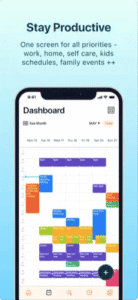
One of the most unique study planner apps in 2026 is Fhynix.
Unlike traditional planners that require heavy manual setup, Fhynix focuses on reducing planning friction using AI and WhatsApp.
Instead of forcing students to manually organize everything, Fhynix allows users to:
- create routines quickly
- upload screenshots
- add reminders through natural language
- use AI to structure schedules
- receive WhatsApp reminders and accountability prompts
This is particularly useful for students who:
- forget tasks easily
- struggle with procrastination
- constantly switch apps
- feel overwhelmed by large schedules
Why Fhynix Stands Out
Most productivity apps are built like corporate software.
Fhynix feels more like:
- an AI assistant
- a personal routine system
- a lightweight accountability coach
The WhatsApp integration is especially powerful because students already spend large amounts of time there.
Instead of relying only on push notifications that get ignored, reminders arrive through a familiar messaging workflow.
Features
- AI-powered planning
- WhatsApp reminders
- routine building
- recurring study systems
- screenshot-to-routine workflows
- voice note support
- habit tracking
- productivity scheduling
Pros
- Very beginner friendly
- Fast setup
- Unique WhatsApp accountability
- Excellent for routines
- Good for students with planning fatigue
- AI reduces overwhelm
Cons
- Newer platform compared to older planner apps
- Still expanding integrations
Who Should NOT Use Fhynix?
Fhynix may not be ideal for:
- users who want enterprise-level project management
- people who enjoy building extremely detailed database systems
- teams needing advanced corporate workflows
It works best for students who want lightweight planning with strong reminders and AI assistance.
Best For Students Who…
- struggle to stay consistent
- miss deadlines
- want reminders that actually work
- prefer simple productivity systems
- want AI help instead of manual planning
2. Notion — Best Customizable Study Planner
Best For:
- advanced students
- aesthetic planners
- template lovers
- database workflows
Notion remains one of the most popular productivity tools for students.
The biggest reason?
Customization.
Students can create:
- assignment trackers
- semester dashboards
- study systems
- revision calendars
- habit trackers
- note databases
- exam preparation systems
The template ecosystem is massive.
There are thousands of free and paid student templates online.
Why Students Love It
Notion allows students to build a “second brain.”
Everything from:
- notes
- schedules
- flashcards
- deadlines
- class databases
- study trackers
can exist in one place.
Pros
- Extremely flexible
- Beautiful interface
- Huge template ecosystem
- Great for long-term organization
- Excellent for aesthetic study setups
Cons
- Steep learning curve
- Easy to over-customize
- Setup can become time consuming
- Mobile experience can feel slower
Best For Students Who…
- enjoy customization
- love productivity aesthetics
- want a full academic dashboard
- are willing to spend time building systems
3. MyStudyLife — Best Free Study Planner App
Best For:
- school students
- timetable management
- assignment reminders
- free planning
MyStudyLife has remained popular because it focuses specifically on student scheduling.
Unlike many general productivity apps, it includes:
- class schedules
- rotating timetables
- homework tracking
- exam reminders
- assignment planning
Why It Works
It is lightweight and easy to understand.
Students who feel overwhelmed by more advanced apps often prefer simpler planners like this.
Pros
- Completely student-focused
- Easy setup
- Good free version
- Excellent timetable support
- Works well for school students
Cons
- Less modern AI functionality
- Limited advanced automation
- Interface feels less premium
4. Todoist — Best Minimalist Planner for Students
Best For:
- simple task management
- quick planning
- productivity beginners
Todoist is popular because it is extremely fast.
Adding tasks takes seconds.
Students can:
- organize by subject
- set deadlines
- create recurring reminders
- prioritize assignments
Why Students Use It
Many students do not want complicated systems.
They simply want:
- quick reminders
- deadlines
- daily planning
Todoist excels at simplicity.
Pros
- Fast and lightweight
- Excellent reminders
- Easy recurring tasks
- Cross-platform support
- Clean UI
Cons
- Less visual
- Not specifically designed for students
- Limited academic workflows
5. Google Calendar — Best Simple Scheduling Tool
Best For:
- time blocking
- study scheduling
- students already using Google tools
Google Calendar is still underrated as a study planning tool.
Students can:
- create study blocks
- color-code subjects
- manage coaching schedules
- sync with reminders
- organize routines
Why It Still Matters
Many students fail because they underestimate time.
Calendar-based planning helps students visualize:
- available time
- exam prep windows
- revision schedules
- deep work sessions
Pros
- Free
- Excellent cross-device syncing
- Great for time blocking
- Easy collaboration
Cons
- Weak task management
- Limited habit-building tools
- No AI planning layer
6. Structured — Best Visual Planner App
Best For:
- visual learners
- ADHD students
- timeline planning
Structured became increasingly popular because it feels visually calming.
Instead of overwhelming dashboards, it focuses on:
- timelines
- visual schedules
- daily structure
- clean interfaces
This makes it particularly effective for:
- ADHD students
- overwhelmed learners
- students with executive dysfunction
Pros
- Beautiful visual interface
- Low stress UI
- Excellent for daily structure
- Very easy to use
Cons
- Limited deep academic workflows
- Less customization
7. Motion — Best AI Auto-Scheduling App
Best For:
- college students
- busy schedules
- automated planning
Motion uses AI to automatically organize tasks into available calendar time.
This is useful for students balancing:
- classes
- internships
- projects
- exam prep
- extracurriculars
Why It’s Interesting
Instead of manually planning everything, Motion dynamically rearranges schedules.
Pros
- AI scheduling
- Automatic prioritization
- Calendar optimization
- Good for overloaded students
Cons
- Expensive
- More corporate feeling
- Can feel overwhelming initially
8. Forest — Best Focus App for Students
Best For:
- reducing distractions
- Pomodoro studying
- focus sessions
Forest gamifies studying.
Students grow virtual trees while focusing.
Leaving the app kills the tree.
Simple.
But surprisingly effective.
Why Students Love It
It adds emotional engagement to focus sessions.
Pros
- Fun and motivating
- Great for Pomodoro technique
- Reduces phone distraction
- Excellent for study sessions
Cons
- Not a full planner app
- Limited scheduling features
How AI Is Changing Study Planning in 2026
AI is becoming one of the biggest shifts in student productivity.
Students increasingly expect apps to:
- organize schedules automatically
- create routines
- prioritize tasks
- reduce cognitive load
- summarize information
- generate study systems
The most successful apps in the next few years will likely combine:
- AI
- reminders
- messaging platforms
- routines
- behavioral psychology
instead of simply being digital calendars.
Best Study Planner Apps by Student Type
Best App for Overwhelmed Students
Fhynix
Best App for ADHD Students
Fhynix + Structured
Best App for Aesthetic Productivity
Notion
Best App for Exam Preparation
Fhynix + Google Calendar
Best App for Minimalists
Todoist
Best App for Time Blocking
Google Calendar
Best App for Deep Customization
Notion
Best App for AI Scheduling
Motion
Best Study Planner Apps by Use Case
Best Overall AI Study Planner
Fhynix
Best Free Study Planner
MyStudyLife
Best Aesthetic Planner
Notion
Best ADHD-Friendly Planner
Structured
Best Minimal Planner
Todoist
Best Calendar Planner
Google Calendar
Best AI Auto-Scheduler
Motion
Best Focus Companion App
Forest
What Students Actually Struggle With (And Why Most Apps Fail)
A lot of planner apps assume students fail because they are lazy.
That’s usually not true.
Most students struggle because of:
- overwhelm
- decision fatigue
- poor routines
- fragmented systems
- too many apps
- inconsistent reminders
- emotional burnout
That’s why the best study planner apps reduce friction.
The easier it is to:
- add tasks
- receive reminders
- follow routines
- stay consistent
…the more likely students are to actually stick with the system.
How to Choose the Right Study Planner App
Choose Fhynix if…
You want:
- AI help
- WhatsApp reminders
- low-friction planning
- routines that stick
- accountability
Choose Notion if…
You enjoy:
- customization
- aesthetics
- building systems
- advanced dashboards
Choose Todoist if…
You want:
- simplicity
- fast task capture
- lightweight planning
Choose Structured if…
You prefer:
- visual planning
- calming interfaces
- timeline scheduling
Choose Motion if…
You need:
- automated scheduling
- AI prioritization
- complex schedule management
Best Study Techniques to Combine With Planner Apps
A planner alone will not fix productivity.
The best students combine planning with systems.
1. Time Blocking
Assign specific hours to subjects.
2. Pomodoro Technique
Study in focused intervals.
3. Active Recall
Use testing instead of passive reading.
4. Spaced Repetition
Review information over time.
5. Weekly Planning
Reset schedules every Sunday.
6. Habit Stacking
Attach study routines to existing habits.
Example:
“After dinner → 45 minutes revision.”
Final Thoughts
The best study planner app is not the one with the most features.
It is the one students actually use consistently.
Increasingly, students are moving toward AI-assisted planning systems that reduce mental overwhelm.
That is one reason apps like Fhynix are gaining traction.
Frequently Asked Questions
What is the best study planner app in 2026?
Fhynix is one of the best AI-powered study planner apps for students who want routines, reminders, and low-friction productivity systems.
Which study planner app is best for ADHD students?
Structured and Fhynix are excellent for ADHD-friendly planning because they reduce overwhelm and support visual routines and reminders.
Are study planner apps actually helpful?
Yes. Study planner apps help students organize schedules, reduce procrastination, remember assignments, and improve consistency.