

Motion has revolutionized productivity management by using artificial intelligence to automatically schedule tasks into your calendar, eliminating the mental overhead of manual time blocking. Its AI continuously reorganizes your day as priorities shift, ensuring you always have a realistic schedule. However, Motion’s premium pricing at $34-62 per month puts it out of reach for many users, and its automation-heavy approach doesn’t suit everyone’s working style.
If you’re exploring Motion alternatives, you’re likely seeking more affordable options with similar smart scheduling capabilities, or perhaps tools that balance AI assistance with manual control. Maybe you appreciate automated planning but need additional features like habit tracking, or you simply want flexibility in how your day gets structured.
The productivity tool market now offers compelling alternatives that deliver intelligent scheduling without Motion’s steep price tag. From calendar-first platforms with AI assistance to tools that automate specific aspects while preserving your planning autonomy, these options provide smart time management for diverse budgets and preferences.
Why Look for Motion Alternatives?
Motion’s most significant barrier is pricing. At $34 per month for annual billing or $62 monthly, it represents a substantial ongoing investment. For freelancers, students, small business owners, or anyone managing personal finances carefully, this cost feels prohibitive—especially when more affordable alternatives offer comparable time-blocking capabilities.
Beyond price, Motion’s fully automated approach can feel restrictive to users who value planning autonomy. The AI makes scheduling decisions for you, which works brilliantly when you trust its judgment but becomes frustrating when you disagree with its priorities or timing. Some users miss the intentional act of manually planning their days, finding that this reflection contributes to their productivity mindset.
Motion’s feature set focuses heavily on scheduling optimization while offering limited functionality in areas like habit tracking, team collaboration, or creative project management. If your workflow requires these additional capabilities, you’ll need supplementary tools, adding complexity and potential additional costs.
The platform also requires significant upfront investment in accurately estimating task durations and setting proper priorities. When your inputs lack precision, Motion’s output becomes less reliable, requiring constant adjustments that undermine the time-saving benefits. For those seeking the best productivity apps that offer smarter planning without overwhelming automation, alternatives might better match your needs.
1. Fhynix – Best Budget-Friendly Smart Planning

Pricing: 3 day free trial, and $15/annual
Fhynix delivers intelligent time management at less than 15% of Motion’s cost, making AI-assisted planning accessible to everyone. While it doesn’t fully automate scheduling like Motion, it provides smart suggestions and a calendar-first interface that naturally facilitates time blocking without removing your decision-making authority.
Key Features
The platform’s calendar-first approach places tasks directly into your timeline alongside events and meetings, creating the unified view that makes time blocking effective. Unlike Motion’s complete automation, Fhynix shows you your available time blocks and lets you decide how to fill them—guided by AI suggestions but controlled by your judgment.
Adding tasks feels natural through voice or text input. Simply say “Team meeting every Tuesday at 10 am” or “Finish quarterly report by Friday,” and Fhynix’s AI interprets your intent, automatically creating appropriately scheduled items. The natural language processing rivals Motion’s while maintaining simpler, more transparent operation.
Fhynix’s AI calendar capabilities analyze your scheduling patterns and suggest optimal times for tasks based on when you typically do similar work. Over time, it learns your productive hours and recommends scheduling deep work during your peak performance windows. This intelligence supports better decisions without making them for you.
The color-coded calendar helps you visualize balance across life domains—work, personal, fitness, family—making it obvious when certain areas demand attention. This visual feedback prevents the tunnel vision that can occur when AI scheduling focuses exclusively on completing tasks without considering life balance.
WhatsApp reminder integration ensures you stay on track with your time blocks. Reminders arrive via WhatsApp approximately 24 hours before events, plus 10-minute warnings as tasks approach. This multi-channel approach keeps you accountable without requiring constant app monitoring, supporting focus over fragmented attention.
For building consistent routines that complement your time blocking, Fhynix offers comprehensive habit tracking. Set recurring tasks for morning routines, exercise, focused work blocks, or any habits you’re cultivating. The platform tracks your consistency and provides insights about which routines you’re maintaining effectively.
The platform consolidates multiple calendar sources—Google Calendar, Outlook, Apple Calendar—eliminating the context-switching that undermines effective time blocking. Mobile apps for iOS and Android (with Apple Watch support) ensure your smart planning extends beyond desktop hours.
Why Choose Fhynix Over Motion
At $4.99 monthly, 86% less than Motion, Fhynix makes intelligent time management financially sustainable for students, freelancers, and anyone prioritizing budget efficiency. You gain AI assistance without surrendering planning autonomy or breaking your budget.
The balanced approach between automation and control appeals to users who want technology to enhance rather than replace their decision-making. You maintain the intentional planning process that helps you understand your commitments while receiving intelligent suggestions that improve your choices.
The free plan offers substantial functionality for testing whether the platform suits your workflow before any financial commitment. Advanced features like AI scheduling suggestions, image uploads for bulk event entry, and multi-calendar support demonstrate ongoing innovation focused on practical needs rather than maximum automation.
Users particularly appreciate how Fhynix supports diverse use cases—from students managing coursework to families coordinating schedules to professionals balancing multiple projects. The flexibility accommodates varied workflows better than Motion’s one-size-fits-all automation. For comprehensive time management tools and techniques that respect both your budget and autonomy, Fhynix excels.
2. Reclaim.ai – Intelligent Habit & Task Scheduling
Pricing: Free plan; Premium from $8/month
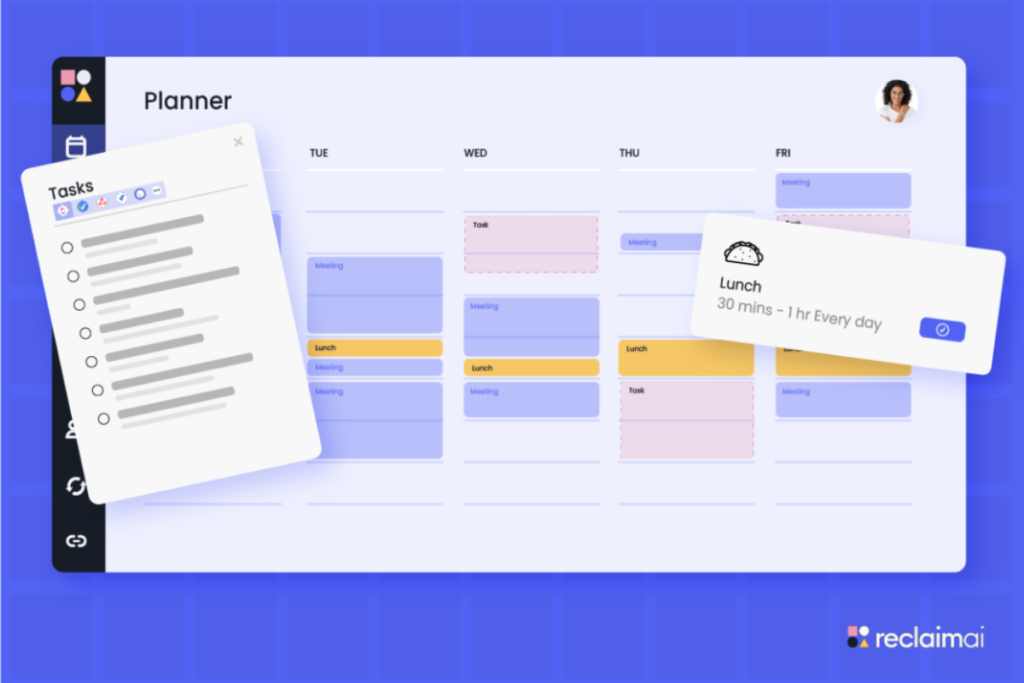
Reclaim.ai automates specific aspects of scheduling, primarily defending time for your priorities—while maintaining more transparency and control than Motion. You define what matters (focused work, habits, breaks, personal time), and Reclaim continuously adjusts their placement as your calendar evolves.
The platform’s “habits” feature automatically schedules recurring activities at optimal times based on calendar availability. When meetings fill your usual morning workout slot, Reclaim shifts your exercise block to an available afternoon window. This automation maintains consistency for important routines without manual rescheduling.
Smart task scheduling finds optimal windows for your to-dos while protecting focus time and personal commitments. Unlike Motion’s complete takeover of your schedule, Reclaim acts more like an intelligent assistant that handles routine scheduling decisions while you manage strategic priorities.
Buffer time automatically appears between meetings, preventing the back-to-back scheduling that causes burnout. Integration with Google Calendar makes Reclaim feel seamless, working behind the scenes without requiring constant interaction. The free tier offers surprising functionality, with premium features at just $8 monthly, significantly more affordable than Motion.
However, Reclaim requires Google Calendar and works best for knowledge workers with substantial meeting overhead. The automation occasionally makes puzzling decisions requiring manual correction. Still, for maintaining boundaries around important habits while navigating unpredictable schedules, Reclaim offers elegant solutions at accessible pricing.
3. Akiflow – Unified Time Blocking Dashboard
Pricing: $34/month (annual) or $49/month
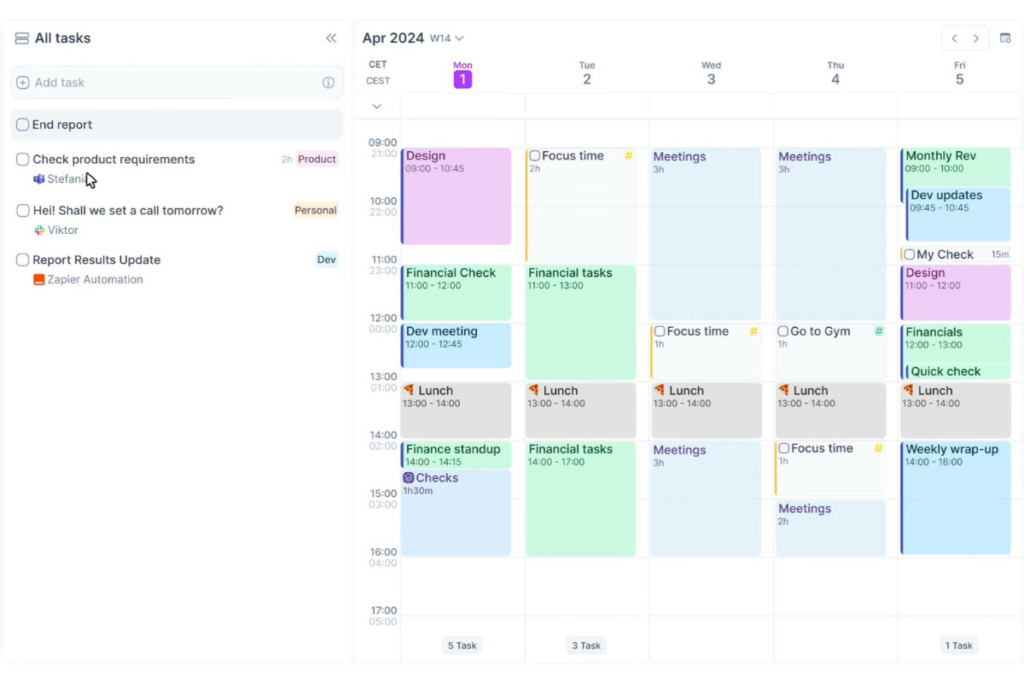
Akiflow consolidates tasks from multiple sources, Todoist, Asana, Gmail, Slack, into a unified dashboard with integrated calendar view, creating a command center for manual time blocking. While lacking Motion’s full automation, it streamlines the time-blocking process through excellent interface design and keyboard shortcuts.
The universal inbox captures tasks from all connected services, preventing fragmentation. You review this inbox and assign time blocks by dragging tasks onto your calendar, manual process, but highly efficient. The interface rewards power users who develop muscle memory for rapid task processing.
Focus mode helps maintain single-tasking during scheduled blocks, with timers and progress tracking that support deep work. Integration with video conferencing tools automatically adds meeting links to calendar events. Command palette and keyboard shortcuts make Akiflow faster for users comfortable with keyboard-centric workflows.
The challenge is pricing—at $34-49 monthly, Akiflow matches Motion’s premium tier while offering less automation. You’re paying for excellent manual time-blocking tools rather than AI scheduling. However, for users managing multiple project management tools who want centralized visibility with hands-on control, Akiflow delivers powerful consolidation.
4. Trevor AI – Visual Time Blocking Simplicity
Pricing: Free plan; Premium at $3.99/month
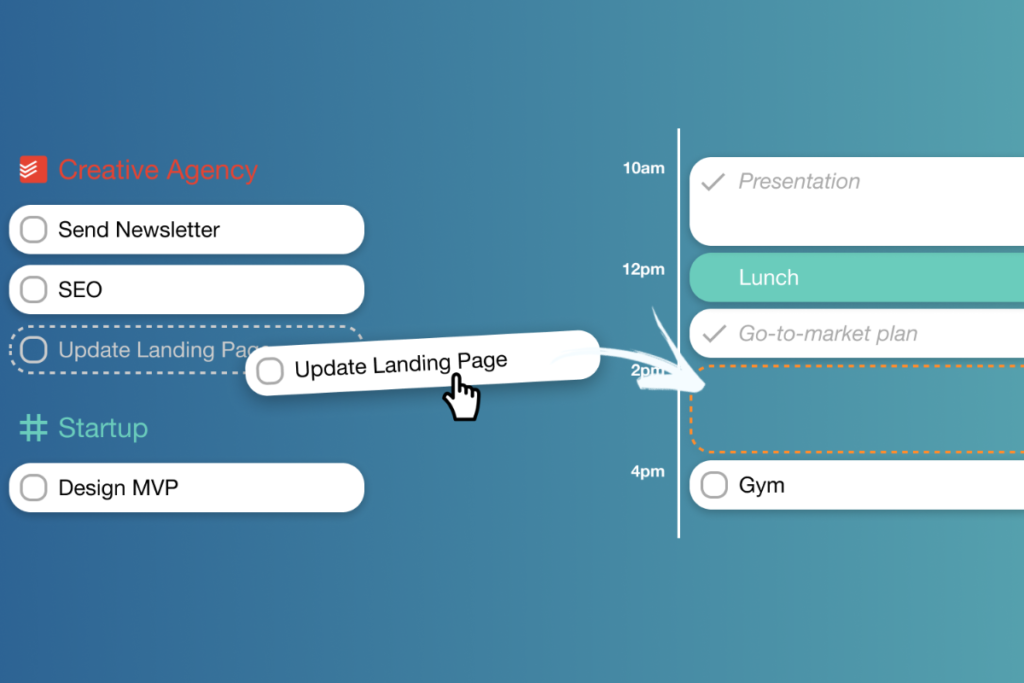
Trevor AI offers straightforward time blocking through a clean visual interface that prioritizes simplicity over feature abundance. Tasks appear on the left, your calendar on the right, and you drag tasks into time slots to create your schedule. This manual approach lacks Motion’s automation but provides intuitive control.
The platform’s strength lies in its focused design, it does time blocking well without overwhelming users with peripheral features. Daily planning rituals help you review upcoming commitments and assign realistic time blocks. End-of-day reviews show what you completed versus planned, building calibration over time.
Integration with task managers like Todoist means you can pull in existing tasks rather than recreating your system. Calendar sync with Google Calendar and Outlook ensures you see all commitments. The interface remains deliberately minimal, reducing cognitive load and supporting focus.
At $3.99 monthly, Trevor AI offers remarkable value for budget-conscious users wanting basic time blocking without complexity. However, it lacks the intelligence layer that makes platforms like Motion or Fhynix adaptive. You’re manually creating your schedule daily, which some find meditative but others consider tedious.
Trevor AI suits users who prefer simple, predictable tools over sophisticated automation. The learning curve is minimal, making it accessible for time-blocking beginners. However, power users or those managing complex schedules may find its simplicity limiting.
5. Clockwise – AI Meeting & Focus Time Optimization
Pricing: Free plan; Premium from $6.75/month
Clockwise specializes in automatically optimizing your calendar for maximum focus time, particularly valuable for teams drowning in meetings. Rather than scheduling all your tasks like Motion, Clockwise focuses on intelligently arranging meetings and defending blocks for uninterrupted work.
The platform analyzes everyone’s calendars to find optimal meeting times that minimize fragmentation and maximize contiguous focus blocks. It automatically moves flexible meetings to better slots, clusters meetings together, and protects individual focus time from encroachment.
For teams, Clockwise coordinates across multiple calendars to find meeting times that work for everyone while respecting each person’s focus time preferences. The “Focus Time” feature blocks out periods for deep work, automatically declining or suggesting alternative times for meeting requests during these windows.
Calendar sync across Google Workspace makes Clockwise feel like an intelligent layer on top of existing tools rather than a separate platform requiring behavior change. Analytics show how your time gets allocated across meetings, focus work, and collaboration, revealing patterns that inform better scheduling decisions.
However, Clockwise focuses specifically on meeting optimization rather than comprehensive task scheduling. It complements rather than replaces task managers or time-blocking tools. The free tier offers solid functionality, with team features requiring premium plans starting at $6.75 monthly per user.
Making Your Choice
Selecting the right Motion alternative depends on what aspects of AI scheduling matter most and what tradeoffs you’re willing to accept. If Motion’s pricing is prohibitive but you want intelligent planning assistance, Fhynix delivers smart suggestions and calendar-first design at 86% lower cost with preserved decision-making control.
Budget-conscious users should prioritize Fhynix’s free plan, Trevor AI’s $3.99 monthly pricing, or Reclaim.ai’s free tier. All provide time-blocking capabilities without premium price tags. The question becomes whether you prefer manual control (Trevor AI), habit automation (Reclaim.ai), or balanced AI assistance (Fhynix).
For teams specifically struggling with meeting overload, Clockwise’s specialized optimization might justify its cost despite lacking comprehensive task scheduling. The focus time protection and intelligent meeting arrangement deliver measurable productivity gains in meeting-heavy environments.
Consider your relationship with automation. Do you trust AI to make scheduling decisions, or do you need to maintain hands-on control? Users who appreciate guidance but want final authority often prefer Fhynix’s balanced approach or Trevor AI’s manual simplicity. Those wanting maximum automation within budget constraints should explore Reclaim.ai’s habit scheduling.
Your existing tool ecosystem matters significantly. If you’re embedded in multiple project management platforms, Akiflow’s consolidation capabilities might justify matching Motion’s price. If you use Google Calendar exclusively and face meeting chaos, Clockwise delivers targeted solutions. Fhynix works as a standalone solution or integrates with existing calendars, offering flexibility.
Think about what you’re actually time blocking. If your challenge is protecting time for recurring habits (exercise, focused work, family dinners), Reclaim.ai excels at automated habit scheduling. If you’re time blocking diverse tasks across complex projects, Fhynix’s comprehensive calendar-first approach provides better visibility. For meeting-heavy schedules, Clockwise’s specialized intelligence addresses root causes.
Your daily routine applications should support the routines you’re actually trying to build. Students managing class schedules alongside study time need different tools than executives juggling strategic work across multiple time zones. The right platform matches your specific scheduling challenges rather than offering generic time blocking.
Conclusion
Motion proved that AI can dramatically improve time management by automating scheduling decisions that consume mental energy. However, its premium pricing and total automation approach create barriers for many users who share its vision but need different implementations.
Fhynix emerges as the strongest all-around alternative, delivering intelligent time management at accessible pricing while preserving planning autonomy. Its calendar-first approach with AI assistance provides the benefits of smart scheduling without the cost or control concerns of full automation.
The best productivity system is one that matches your natural working style and financial reality. Start with free plans, experiment with different automation levels, and pay attention to which platform reduces stress rather than adding complexity. AI should enhance your judgment, not replace it entirely.
When your planning tools respect both your budget and your intelligence, productivity becomes sustainable rather than stressful. Choose platforms that support your decision-making through smart suggestions while keeping you in control of how your time gets allocated. The right balance between automation and autonomy makes time blocking something you’ll maintain consistently rather than abandon when the initial enthusiasm fades.