

If you’ve ever Googled “schedule apps free,” you already know the problem: there are way too many options, and most of them either lock essential features behind paywalls or feel clunky to use every day.
Students juggling classes and assignments, professionals managing work meetings, and anyone trying to balance personal life with daily responsibilities all face the same challenge—finding a scheduling app that’s simple, flexible, and doesn’t cost a fortune.
This guide cuts through the noise. We’ve looked at what real users say on Reddit, tested popular options, and focused on what matters most: ease of use, free features that are actually useful, and tools that help you plan without creating more work. Let’s dive into the five best free schedule apps that people are actually using in 2026.
What Makes a Good Free Schedule App?
Before we get into the list, let’s clarify what “good” means here.
- Actually be free — not a 7-day trial disguised as a free app
- Combine calendar and tasks — seeing appointments alongside to-dos in one place
- Sync across devices — because you’re not always at your desk
- Be easy to update — rigid apps get abandoned quickly
- Work with your existing tools — Google Calendar, Apple Calendar, etc.
Most importantly, it shouldn’t feel like you need a tutorial just to add an event. The apps below meet these criteria and have proven track records with real users, not just flashy marketing pages.
1. Fhynix: Smart Scheduling Without the Mental Load
Best for: People who want AI-powered scheduling that adapts to real life

Fhynix is built to solve a common problem with traditional planners: they demand constant manual upkeep. When plans change, most tools break. Fhynix adjusts. Instead of managing separate lists and calendars, everything lives in one unified timeline.
What makes Fhynix different
- Natural task & event entry: Add tasks or events by typing or speaking naturally. For example, say “Team meeting Thursday at 2 pm” and it appears directly on your calendar.
- Calendar-first planning: Tasks, meetings, routines, and reminders all show up in one timeline view, so you can see exactly how your day is shaped.
- Automatic schedule adjustments: When plans change, Fhynix helps reorganize your schedule intelligently instead of leaving gaps.
- Smart reminders that match real life: Reminders are tied to time on your calendar, so notifications arrive when they’re actually useful.
🎬 Calendar-first planning demo (video)
Watch how tasks and events live together in your timeline
🎬 Smart reminders demo (video)
See how reminders adapt to your real-life schedule
Why people choose Fhynix
Fhynix is designed for people who are tired of maintaining their planning system instead of using it. It works especially well when days don’t go exactly as planned—which is most days. Users often move to Fhynix after realizing that static planners look good in theory but fall apart when life gets busy.
Availability & pricing: Free trial (7 days) • iOS and Android • Premium unlocks advanced automation
2. Google Calendar: The Reliable Standard
Best for: People already using Gmail and Google Workspace
Google Calendar dominates the “favorite scheduling app” conversation on Reddit for good reason—it’s free, reliable, and integrates with nearly everything.
What users love:
- Clean, simple interface that doesn’t overwhelm
- Color-coded calendars for work, personal, family
- Works seamlessly with Gmail (auto-adds flights, hotels)
- Easy sharing for coordinating with teams or family
- Works offline
Where it falls short:
Google Calendar is excellent at showing when things happen but doesn’t help much with what you need to do. That’s why many users pair it with Google Tasks or a separate to-do app.
One Reddit user summed it up: “Google Calendar works for me… because it integrates everything.” For those who want a shared calendar app that multiple people can access, Google Calendar makes collaboration straightforward.
Pricing: Free • Platforms: Web, iOS, Android
3. Notion Calendar (formerly Cron): For the Notion Ecosystem
Best for: People who already organize their life in Notion
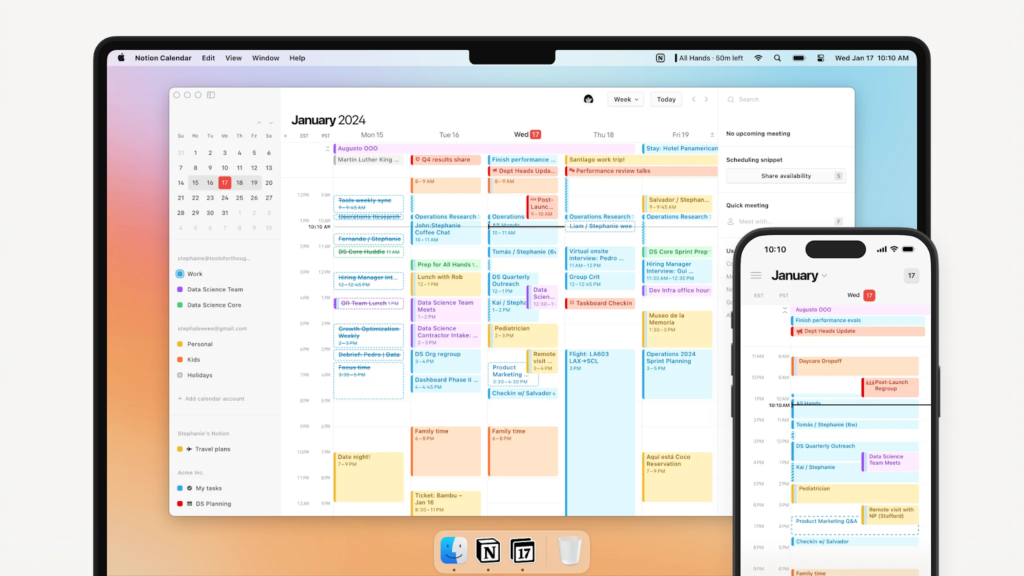
If you’re deep in the Notion ecosystem, Notion Calendar integrates directly with your workspace, allowing you to connect meeting notes, project docs, and calendar events in one place.
Key features:
- Syncs with Google Calendar and Outlook
- Attaches Notion docs directly to calendar events
- Clean design with dark mode
- Shows multiple calendars at once
- Countdown to next event on home screen
Reddit users like the integration: “I like Notion Calendar. It integrates nicely with Apple and Google calendars. You can attach multiple docs and files.”
The catch: Notion Calendar works best if you’re already using Notion for notes and projects. If you’re not, it’s probably overkill.
Pricing: Free • Platforms: Web, macOS, iOS, Android (limited)
4. Apple Calendar + Reminders: Simple and Native
Best for: iPhone and Mac users who prefer built-in apps
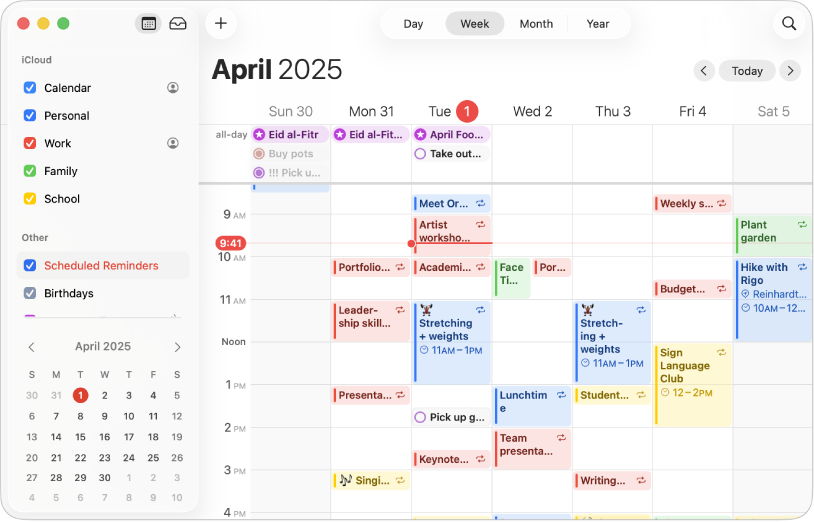
Sometimes the best app is the one already on your device. Apple Calendar paired with Apple Reminders gives you a surprisingly powerful scheduling system without downloading anything new.
Why it works:
- Already synced across all your Apple devices
- No learning curve
- Integrates with Siri for voice entry
- Free, with no ads or upsells
- Clean design that matches iOS
Multiple Reddit users mentioned sticking with Apple’s native apps: “I honestly like the default Apple ecosystem for Calendar, Reminders etc.” and “I utilize a mixture of reminders and calendar applications from Apple’s ecosystem.”
Limitations: The combo works beautifully within Apple’s world but doesn’t play as nicely with Google services or Windows devices. For students looking for straightforward daily routine applications, Apple’s native tools handle basic scheduling without complications.
Pricing: Free (included with Apple devices) • Platforms: iOS, macOS, web (iCloud)
5. Todoist: Task Management with Calendar View
Best for: People who think in tasks more than events
Todoist recently added calendar functionality, which bridges the gap between task lists and time blocking. This makes it one of the few apps that genuinely combines scheduling and task management.
What makes it stand out:
- Natural language input: “Throw trash out every other Tuesday” automatically creates recurring tasks
- Calendar view shows tasks alongside scheduled events
- Filters and labels for organizing complex projects
- Syncs with Google Calendar
- Gamification (productivity streaks) for motivation
One Reddit user called it life-changing: “love laugh love todoist. the app has seriously changed my life… the natural language is a game changer.”
Downsides: The free version is somewhat limited (10 active projects, basic filters). To unlock full potential, you need Todoist Premium. However, for students or professionals who need a todo app with tasks and calendar, the free version is still functional.
Pricing: Free; Premium $4/month • Platforms: Web, iOS, Android, Windows, macOS
What Reddit Actually Says About Schedule Apps
When you look past the sponsored posts and marketing sites, here’s what real users on r/productivity say they value:
- Simplicity wins — “I messed around with premium apps for a while and realized I was becoming a slave to them and was doing more planning and less doing.”
- Integration matters — Most people use Google Calendar as their base because it connects with work email, personal accounts, and syncs everywhere.
- Hybrid approaches are common — Many users combine a calendar app with task management (Google Calendar + Todoist, Apple Calendar + Reminders, etc.)
- Expensive apps don’t guarantee results — Several users mentioned trying premium scheduling apps, then returning to free options because the complexity wasn’t worth it.
The pattern is clear: people want tools that reduce friction, not create new systems to maintain.
Which Free Schedule App Should You Choose?
You can also mix and match. Many productive people use Google Calendar as their scheduling backbone while adding Todoist, Fhynix, or Apple Reminders for task management.
Beyond Scheduling: What Happens When Apps Aren’t Enough
Even the best schedule apps have limits. Static tools show you what’s planned, but they don’t help when you’re overwhelmed, priorities shift, or deadlines pile up. This is where how to plan your day becomes more about strategy than just having the right app. Tools help, but understanding how you work best matters more.