
Let’s be honest — searching for a “personal daily planner” app feels like opening Pandora’s box. There are hundreds of options, most promising to “transform your productivity,” and yet most people end up abandoning them within two weeks.
If you’ve ever downloaded a planner app only to watch it collect digital dust, you’re not alone. The issue isn’t you — it’s that most daily planners create more work than they solve.
This guide cuts through the noise by looking at what real people say on Reddit’s productivity communities. We’ll explore what actually works for personal daily planning in 2026, why time blocking apps often fail, and which tools people stick with long-term.
Why Most Personal Daily Planners Don’t Stick
The pattern shows up again and again in Reddit threads: someone gets excited about a new planner app, uses it religiously for a week, then quietly stops.
Here’s what usually goes wrong:
Time blocking becomes a second job — Apps like Structured and Sorted promise perfect schedules, but when one task runs over, you’re manually adjusting everything else. As one Reddit user put it: “If a task takes longer than the time I blocked for it, do I have to manually go and adjust the times for all the rest of my upcoming tasks?”
Rigid systems don’t match real life — Your day rarely goes exactly as planned. When your planner can’t adapt, it stops being helpful and starts being stressful.
Too many features, not enough simplicity — Some apps try to do everything: tasks, habits, notes, goals, calendars. The learning curve becomes exhausting, and suddenly you’re spending more time organizing than actually doing.
Mobile distractions — One user mentioned avoiding phone-based planners entirely: “I do not trust myself with phones since they’re a major distraction for me.”
The best personal daily planner isn’t the one with the most features — it’s the one you’ll actually use when life gets messy.
What People Actually Want from a Daily Planner
When you strip away the marketing language, here’s what users on Reddit say they need:
A Unified View of Everything
People don’t want to jump between five different apps to see their day. They want tasks, events, appointments, and reminders in one place.
As one user explained: “Things 3 and Apple Calendar (connected to Google Calendar) is all I need.” The key phrase? “All I need.” Simplicity wins.
Easy Task Entry (No Friction)
The faster you can capture a task, the more likely you’ll use the planner consistently. Voice input, natural language processing, and quick-add features matter more than you’d think.
Nobody wants to fill out forms just to remember to buy milk.
Flexibility When Plans Change
Static time blocks sound great in theory, but real life doesn’t work that way. A good personal daily planner should adapt when your 30-minute meeting turns into an hour, or when an urgent task appears mid-afternoon.
One user shared their solution: “I had the same problem with apps like Structured and Sorted – adjusting blocks every time a task runs over is tiring.”
Reminders That Actually Work
In-app notifications get ignored. WhatsApp reminders, however? People pay attention to those. Several users mentioned that reminders integrated with messaging apps actually keep them on track.
Personal Daily Planner Options (What Real Users Recommend)
Let’s look at what people are actually using, based on Reddit discussions and app store reviews.
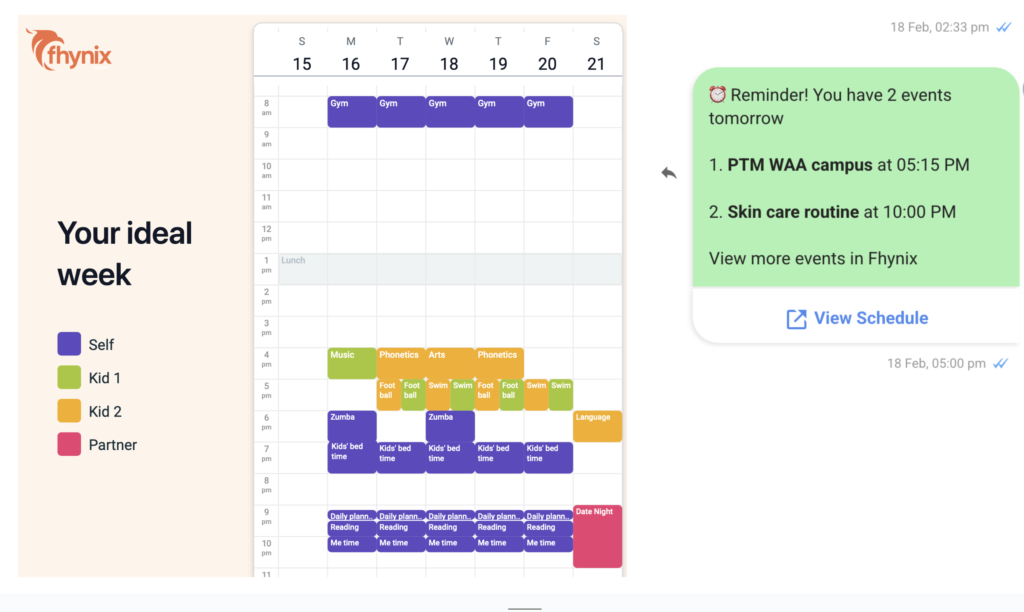
Fhynix — Smart Planning Without the Manual Work
Best for: People tired of constantly rearranging their schedule
Fhynix solves the biggest complaint about time-blocking apps: the need to manually adjust everything when plans change.
Here’s what makes it different:
- Voice and text input — Add tasks by speaking or typing naturally. Say “dentist appointment Thursday 3pm” and it’s scheduled.
- WhatsApp reminders — Get notifications where you actually look (your messages), not just another app notification you’ll swipe away.
- Flexible scheduling — Tasks integrate with your calendar timeline, so you see everything in one view without rigid time blocks.
- Easy rescheduling — When something runs long, you don’t have to manually shift everything else.
Students and busy professionals mention Fhynix as a solution when structured time blocking became too much maintenance. As one user noted: “I started using Fhynix because you can add your plans easily just by speaking or typing, and changing things is simple even when your day doesn’t go as expected.”
It’s especially useful if you’ve tried apps like Structured or Sorted but found them too rigid. The focus is on keeping you on track without creating extra work.
Pricing: Free version available; premium for advanced features
Platforms: iOS, Android
Google Calendar + Tasks — The Simple Standard
Best for: People who want something reliable that just works
Sometimes the best planner is already on your phone. Google Calendar paired with Google Tasks gives you a functional system without downloading anything new.
What works:
- Free and familiar
- Syncs across all devices
- Integrates with Gmail (auto-adds confirmations)
- Color-coding for different life areas
- Simple interface
What doesn’t:
- Not great for detailed task management
- Limited automation
- Requires discipline to maintain
Multiple Reddit users stick with this combo because it’s low-friction. One said simply: “I use the calendar on the phone for planning.”
For those looking for a best todo app with tasks and calendar, combining Google Calendar with a dedicated task manager often works better than all-in-one solutions.
Todoist + Sunsama — The Power User Combo

Best for: People managing complex projects alongside daily tasks
This pairing shows up frequently in productivity discussions. Todoist handles task capture and organization, while Sunsama adds daily planning and time blocking.
One user explained their workflow: “I personally use todoist + sunsama after trying a lot of different things. I have projects in todoist with a next up section and that is what I scan when planning my day in sunsama.”
The upside: Powerful and flexible
The downside: Two separate subscriptions, steeper learning curve
If you’re serious about how to plan your day and willing to invest time learning a system, this combo delivers.
Structured — Time Blocking for Focused Days
Best for: People who like visual timelines and Apple ecosystem
Structured gets mentioned often for its clean design and timeline view. You can see your entire day at a glance, drag tasks around, and time-block visually.
However, users consistently mention the same frustration: manual adjustments. When one task runs over, you’re manually shifting everything else.
One user noted: “I like structured. You can put all your tasks in and then time block your day,” but others pointed out the app hasn’t been updated in a while, causing anxiety about its future.
Still works well if you have predictable days and prefer the Apple ecosystem.
Paper and Pen — The Analog Option
Best for: People who find digital tools distracting
Don’t overlook the classics. Multiple Reddit users swear by physical planners:
“For personal and daily life, i have a pocket notebook, ol plain pen and paper.”
Another user detailed their analog system: “Paper and a cheap four color journalist’s pen. I have a different overriding theme for every day of the week.”
The benefits are real:
- No learning curve
- No battery to die
- No notifications or distractions
- Tactile satisfaction of crossing things off
If digital planners feel like they’re adding stress instead of reducing it, going analog might be your answer. Pairing a physical planner with best reminder apps for iPhone gives you the best of both worlds.
Time Blocking Problem (And How to Solve It)
Time blocking is popular in productivity circles, but it has a fatal flaw: it assumes your day will go exactly as planned.
Spoiler alert — it never does.
Here’s what happens:
- You carefully time-block your entire day
- One meeting runs 20 minutes over
- Now everything else is shifted
- You spend 10 minutes manually adjusting the rest of your schedule
- You get frustrated and abandon the system
Sound familiar?
Better approaches:
Theme-based blocking — Instead of “9:00-9:30 write email,” try “9:00-11:00 deep work.” This gives flexibility within boundaries.
Category batching — Group similar tasks together rather than assigning exact times. As one user mentioned: “I’ve found that blocking time for task categories works much better and feels less mentally taxing.”
Adaptive scheduling — Use tools that adjust automatically when plans change, rather than forcing you to manually shift everything.
For those interested in best planner for time blocking, the key is finding a balance between structure and flexibility.
What Makes a Good Personal Daily Planner in 2026?
Based on real user experiences, here’s what actually matters:
Low friction for adding tasks — If it takes more than 10 seconds to capture a thought, you won’t use it consistently.
One unified view — See everything (tasks, events, reminders) in one place without switching apps.
Smart reminders — Notifications that actually get your attention, not just pile up in your notification center.
Adapts to reality — Your planner should handle changes gracefully, not force you to manually reorganize everything.
Works offline — Because internet connections aren’t always reliable.
Syncs across devices — Start planning on your phone, finish on your laptop.
The perfect planner doesn’t exist, but the right one for you checks most of these boxes.
When to Ditch Your Daily Planner
Sometimes the problem isn’t finding the right app — it’s realizing you don’t need one at all.
Consider simplifying if:
- You’re spending more time organizing than doing
- Your planner stresses you out instead of helping
- You have fewer than 5 things to remember per day
- You keep switching apps every few weeks
One Reddit user shared a valuable insight: “I use Sunsama religiously for half a year taught me that all I need to care about is today.”
Sometimes best daily routine applications are less about fancy features and more about building consistent habits that don’t require constant digital management.
Final Thoughts
The best personal daily planner is the one you’ll still be using in three months.
It might be Fhynix with WhatsApp reminders. It might be Google Calendar with sticky notes. It might be a $3 notebook from the drugstore.
What matters is finding a system that reduces mental load instead of adding to it.
Start simple. Use one tool for two weeks. If it feels like work to maintain, try something else. The goal isn’t perfect organisation — it’s having more time and energy for the things that actually matter.
Frequently Asked Questions:
It depends on your needs. For flexibility and smart reminders, Fhynix works well. For simplicity, Google Calendar + Tasks is reliable. For detailed project management, Todoist + Sunsama is powerful. The best planner is the one you’ll actually use consistently.
Not necessarily. Many people successfully use their phone’s built-in calendar and reminders. A dedicated daily planner app helps when you need features like task management, habit tracking, or automatic rescheduling that basic calendar apps don’t offer.
This usually means the app requires too much maintenance. Look for planners with quick task entry (voice or natural language), automatic syncing, and flexible scheduling. Or consider going analog with a paper planner paired withtime management tools.
Instead of blocking individual tasks with exact times, try blocking categories of work (e.g., “deep work” or “admin tasks”) in 2-3 hour chunks. This gives you flexibility when things take longer than expected. Alternatively, use apps with auto-scheduling features.
Yes, and many people do. Common combinations include a calendar app for events and a task manager for to-dos. Just avoid over-complicating your system — if you’re juggling more than two apps, you’re probably creating unnecessary friction.