
Looking for a Routine alternative that puts your calendar first? You’re in the right place. While Routine offers solid task management and note-taking capabilities, many users seek alternatives that better integrate tasks directly into their calendar timeline – creating one unified view of their entire day.
In this comprehensive guide, we’ll explore the 5 best Routine alternatives that excel at calendar-first productivity. Whether you’re a busy professional, student, or someone managing multiple responsibilities, these tools will help you plan your days more effectively.
What is Routine and Why Look for Alternatives?
Routine is a popular productivity app that combines tasks, calendar management, and note-taking into a single platform. It’s designed for busy professionals who want to consolidate their workflow and plan their week efficiently.
Key Features of Routine
- Consolidated calendar view with multiple calendars
- Task management with time blocking
- Note-taking and documentation
- Meeting scheduling and management
- Desktop and mobile apps
Why People Seek Routine Alternatives
Despite its strengths, users often look for alternatives because:
- Limited calendar integration – Tasks exist separately from calendar events rather than appearing in the timeline
- Slower development cycle – Small team means features roll out less frequently
- Missing mobile features – Some desktop features aren’t available on mobile
- No WhatsApp reminders – Lacks integration with messaging platforms
- Manual planning required – Doesn’t offer guided or AI-assisted planning
If you’re looking for something with better calendar integration, more frequent updates, or unique features like WhatsApp reminders, these alternatives will serve you well.
Comparison Table: 5 Best Routine Alternatives
| Feature | Fhynix | Motion | Sunsama | Morgen | Structured |
| Tasks in Calendar Timeline | ✅ Yes | ✅ Yes | ✅ Yes | ✅ Yes | ✅ Yes |
| WhatsApp Reminders | ✅ Yes | ❌ No | ❌ No | ❌ No | ❌ No |
| AI-Powered Features | ✅ Event creation | ✅ Auto-scheduling | ❌ Limited | ❌ No | ❌ No |
| Multiple Calendar Sync | ✅ Google, Microsoft, Apple | ✅ Google, Outlook | ✅ Google, Outlook | ✅ All major | ✅ Google, Apple |
| Mobile App | ✅ iOS & Android | ✅ iOS & Android | ✅ iOS & Android | ✅ iOS & Android | ✅ iOS & Android |
| Free Tier | ✅ Yes | ❌ No (7-day trial) | ❌ No (14-day trial) | ✅ Yes (limited) | ✅ Yes (limited) |
| Pricing (Monthly) | Free – $4.99 | $34 | $20 | Free – $14 | Free – $9.99 |
| Best For | Calendar-first planning | AI automation | Mindful planning | Multi-calendar users | Simple daily planning |
1. Fhynix – Best Calendar-First Daily Planner

Why Fhynix is the #1 Routine Alternative:
Fhynix takes a fundamentally different approach than Routine by bringing your to-dos directly into your calendar timeline. Instead of managing tasks in a separate list view, everything appears as part of your daily schedule – creating one unified planner for all your routines, events, and goals.
Key Features
✅ Tasks Appear in Calendar Timeline Unlike Routine where tasks and calendar events are somewhat separate, Fhynix shows tasks as part of your daily schedule. This makes time blocking natural and effortless.
✅ WhatsApp Reminders for Calendar Events Get reminded about important calendar events directly on WhatsApp – the app you’re already checking constantly. This unique feature ensures you never miss meetings or appointments. Learn more about WhatsApp reminders.
✅ AI-Powered Event Creation Add events using natural language: “Team meeting tomorrow at 3 PM” or even upload images of schedules. The AI converts them into calendar events automatically.
✅ Multiple Calendar Integration Sync Google Calendar, Microsoft Outlook, and Apple Calendar to see everything in one unified timeline. Perfect for managing work, personal, and family calendars together.
✅ Color-Coded Organization Distinguish between work, personal, fitness, and family events at a glance with customizable color coding.
✅ Cross-Platform Availability Available on iOS, Android, and web – your schedule syncs seamlessly across all devices.
Pricing
- Free tier – Full calendar features with basic reminders
- Premium – $4.99/month for unlimited events and advanced features
Who Should Use Fhynix?
Fhynix is perfect for:
- Busy professionals juggling multiple calendars
- Students managing academic schedules
- Families coordinating shared events
- People with ADHD who benefit from visual timelines
- Anyone wanting calendar-first daily planning
Why We Rank Fhynix #1
While Routine requires manual organization of tasks alongside your calendar, Fhynix naturally integrates everything into one timeline. The WhatsApp reminder feature alone sets it apart – you get notifications where you’re already spending time, not in yet another app you need to check.
2. Motion – AI-Powered Task Scheduling
Best for: Professionals wanting automated task organization
Motion differentiates itself through AI-powered automatic scheduling. Instead of manually dragging tasks onto your calendar like in Routine, Motion’s AI does it for you based on priorities, deadlines, and available time.
Key Features
- AI scheduler automatically organizes your day
- Project management capabilities beyond simple tasks
- Meeting booking with availability checking
- Automatic rescheduling when urgent tasks arise
- Team collaboration features
Pricing
$34/month (7-day free trial)
Pros & Cons
Pros:
- Hands-off approach saves time on planning
- Great for managing complex projects
- Excellent for teams
Cons:
- Expensive compared to alternatives
- Steeper learning curve
- Less control over exact scheduling
- No free tier
Motion is ideal if you have a jam-packed schedule and want AI to handle the heavy lifting of organizing your day. However, the high price point and lack of features like WhatsApp reminders make Fhynix a more accessible choice for most users.
3. Sunsama – Mindful Daily Planning

Best for: Users seeking work-life balance and intentional planning
Sunsama focuses on mindful, intentional planning with guided daily planning sessions and work-life balance features.
Key Features
- Guided daily planning helps you organize each morning
- Shutdown ritual for end-of-day reviews
- Focus mode with timers
- Task consolidation from Asana, ClickUp, Notion, etc.
- Planned vs. actual time tracking
Pricing
$20/month (14-day free trial)
Pros & Cons
Pros:
- Beautiful, minimalist design
- Prevents over-scheduling with workload warnings
- Excellent for maintaining work-life boundaries
- Strong integration ecosystem
Cons:
- More expensive than Fhynix
- Requires daily ritual commitment
- Can feel slow for fast-paced users
- No free tier
Sunsama excels at helping you slow down and plan mindfully. However, if you want a simpler, more affordable daily routine application with unique features like WhatsApp reminders, Fhynix offers better value.
4. Morgen – Multi-Calendar Integration Specialist
Best for: Users managing many different calendars
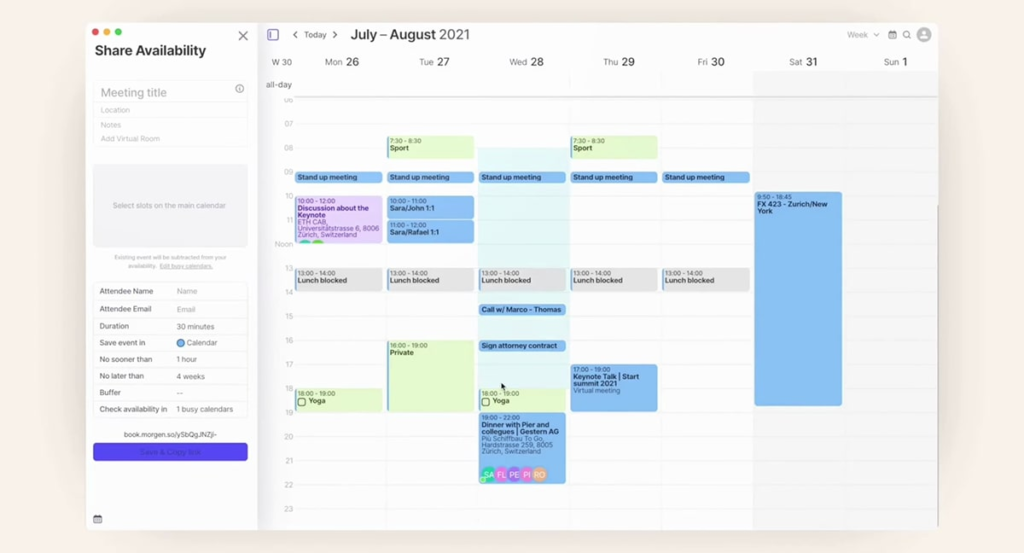
Morgen specializes in consolidating multiple calendars with a clean, intuitive interface across all platforms.
Key Features
- Extensive calendar support (Google, Outlook, Apple, Fastmail, etc.)
- Calendar shortcuts to view subsets of calendars
- Meeting scheduler with availability checking
- Task integration with Todoist, Notion, and others
- Cross-platform (macOS, Windows, Linux, iOS, Android)
Pricing
Free tier available; Premium at $14/month
Pros & Cons
Pros:
- Excellent Linux support
- Clean, uncluttered interface
- Good calendar sync features
- Reasonable pricing
Cons:
- Task management is basic
- No WhatsApp integration
- Calendar-focused, less robust for tasks
- Mobile requires premium
Morgen is solid for calendar consolidation but lacks the task-in-timeline integration that makes Fhynix stand out. It’s best for those primarily needing calendar management with light task support.
5. Structured – Simple Visual Day Planning

Best for: Users wanting minimalist daily planning
Structured is an elegant, minimalist daily planner that combines tasks and appointments in a visual timeline.
Key Features
- Visual timeline showing your entire day
- Simple task management with drag-and-drop
- No ads and privacy-focused
- Beautiful design focused on essentials
- Recurring tasks support
Pricing
Free tier available; Pro at $9.99/month or lifetime purchase
Pros & Cons
Pros:
- Beautiful, intuitive interface
- Lightweight and fast
- Privacy-focused (no data selling)
- Affordable
Cons:
- Very basic features
- Limited calendar integration
- No advanced planning tools
- No collaboration features
Structured is perfect if you want something simple and beautiful. However, Fhynix offers more comprehensive features – especially WhatsApp reminders and multi-calendar sync – at a similar price point.
Detailed Feature Comparison
Calendar Integration
Winner: Fhynix & Morgen (tie)
Both excel at integrating multiple calendars, but Fhynix takes it further by making tasks part of the calendar timeline rather than a separate view. This creates the truly unified experience Routine users are seeking.
Task Management
Winner: Fhynix
While all five alternatives handle tasks, Fhynix’s approach of showing tasks directly in your daily timeline (not as a sidebar or separate view) makes it easiest to see exactly when you’ll do each task. This is perfect for time blocking your day.
Unique Features
Winner: Fhynix
WhatsApp reminders are a game-changer that none of the other alternatives offer. Since most people check WhatsApp dozens of times per day, getting calendar reminders there ensures they’re never missed.
AI & Automation
Winner: Motion
Motion’s AI scheduler is the most advanced, though Fhynix’s natural language event creation and image-to-calendar features offer practical automation without the high price tag.
Work-Life Balance
Winner: Sunsama
Sunsama’s guided planning and shutdown rituals are specifically designed for work-life balance, though Fhynix’s ability to integrate personal, work, and family calendars in one timeline helps achieve similar goals.
How to Choose the Right Routine Alternative
Choose Fhynix if you want:
✅ Tasks that appear directly in your calendar timeline
✅ WhatsApp reminders for calendar events
✅ Affordable pricing with a free tier
✅ Simple, intuitive interface
✅ Multi-calendar sync (work, personal, family)
✅ ADHD-friendly visual planning
Choose Motion if you want:
✅ AI to automatically schedule your tasks
✅ Advanced project management
✅ Budget isn’t a concern ($34/month)
✅ Team collaboration features
Choose Sunsama if you want:
✅ Guided daily planning rituals
✅ Focus on work-life balance
✅ Mindful, intentional approach
✅ Beautiful minimalist design
Choose Morgen if you want:
✅ Extensive calendar platform support
✅ Linux compatibility
✅ Calendar-focused experience
✅ Basic task management
Choose Structured if you want:
✅ Ultra-simple daily planning
✅ Beautiful visual interface
✅ Privacy-focused approach
✅ Minimal features
Making the Switch from Routine
Step 1: Export Your Data
Most of these alternatives support importing from Google Calendar and other services. If you’ve been using Routine with Google Calendar integration, your events are already in Google – just connect the new app.
Step 2: Choose Your Alternative
Based on your priorities from the comparison above, pick the alternative that best matches your needs. For most users seeking calendar-first productivity, Fhynix offers the best balance of features, usability, and price.
Step 3: Set Up Calendar Integration
Connect all your calendars (work, personal, family) to get a complete view. Fhynix makes this easy with support for Google, Microsoft, and Apple calendars.
Step 4: Establish Your Planning Routine
Whether you choose Fhynix’s straightforward calendar-timeline approach or Sunsama’s guided planning, commit to a daily planning habit. Learn how to plan your day effectively for better results.
Frequently Asked Questions
Is there a free alternative to Routine?
Yes! Fhynix offers a comprehensive free tier with full calendar features and basic reminders. Morgen and Structured also have free tiers, though with more limitations.
Which Routine alternative is best for ADHD?
Fhynix is excellent for ADHD because it shows tasks in a visual timeline, making it easy to see your entire day at a glance. The WhatsApp reminders also help with time blindness. Read our guide on ADHD time management tools for more strategies.
Can I use these alternatives on mobile?
All five alternatives have mobile apps for iOS and Android. Fhynix’s mobile app provides full access to your calendar timeline with WhatsApp reminders on the go.
Which alternative has the best calendar integration?
Fhynix and Morgen both excel at calendar integration. Fhynix goes further by showing tasks directly in the calendar timeline, while Morgen supports more calendar platforms including Linux options.
Do any alternatives offer WhatsApp reminders like Fhynix?
No – Fhynix is unique in offering WhatsApp reminders for calendar events. This feature alone makes it stand out among reminder apps.
What’s the cheapest Routine alternative?
Fhynix at $4.99/month (with a robust free tier) is the most affordable premium option. Structured offers similar pricing at $9.99/month, while Sunsama ($20) and Motion ($34) are more expensive.
Can I manage work and personal calendars together?
Yes! All five alternatives support multiple calendar integration. Fhynix makes it especially easy by color-coding different calendar types in one unified timeline. Learn more about shared calendar apps.
Which alternative is best for students?
Fhynix is ideal for students because it’s affordable, shows your enti e schedule in one timeline, and offers WhatsApp reminders for classes and assignments. Check out our best school planner apps guide for more options.
Conclusion: Fhynix Leads the Pack
While all five alternatives offer improvements over Routine in different areas, Fhynix stands out as the best overall choice for calendar-first productivity.
Here’s why:
✅ True calendar-first approach – Tasks appear directly in your timeline, not as a separate list
✅ WhatsApp reminders – Get notified where you’re already active
✅ Affordable pricing – Free tier plus $4.99/month premium
✅ Multi-calendar sync – Work, personal, and family in one view
✅ AI-powered features – Natural language and image-to-calendar
✅ Cross-platform – iOS, Android, and web
Whether you’re a busy professional, student managing academic goals, parent coordinating family schedules, or someone with ADHD needing visual planning, Fhynix delivers the calendar-first experience that Routine users are looking for – without breaking the bank.
Ready to upgrade your productivity?
Download Fhynix: iOS | Android For more productivity insights, explore our guides on creating effective to-do lists, building lasting habits, and mastering time management.