
Managing your daily life shouldn’t require juggling multiple apps. In 2026, the best iPhone organizer apps take a unified, calendar-first approach—showing your tasks, events, and routines together in one visual timeline. This simplifies planning, reduces mental clutter, and helps you stay consistent with what matters most.
Whether you’re a student balancing classes and assignments, a professional managing meetings and projects, or someone building better habits, having the right organizer can transform how you approach each day. The key is finding a tool that doesn’t just store information but actively supports your productivity and wellbeing.
This guide explores what makes an iPhone organizer truly effective in 2026, the features you should prioritize, and how calendar-first design creates a planning experience that’s both simple and powerful.
Why You Need a Calendar-First iPhone Organizer
Traditional organizer apps separate tasks from your schedule. You maintain a to-do list in one place and a calendar in another, forcing you to mentally combine them throughout the day. This fragmentation creates unnecessary friction and makes planning feel like a chore.
A calendar-first organizer solves this by integrating everything into one timeline. Your tasks appear directly alongside events and routines, giving you a complete picture of your day at a glance. This approach aligns with how productive people actually work—they don’t just list tasks, they schedule them.
The Problem with Disconnected Apps
When your organizer keeps tasks separate from your calendar:
- You constantly switch between apps to understand your day
- Tasks feel abstract because they lack specific time commitments
- Important deadlines compete for attention with routine activities
- You waste mental energy deciding when to do things
- Scheduling conflicts go unnoticed until it’s too late
How Calendar-First Design Works Better
When tasks live inside your calendar timeline:
- Everything is visible in one view—no app switching needed
- Tasks become time-bound commitments, not floating ideas
- You see exactly when your day is full or has breathing room
- Scheduling becomes automatic when adding new tasks
- Your entire routine balances naturally across work, rest, and growth
This shift from list-based to timeline-based planning is what makes modern iPhone organizers more effective than traditional task managers.
Essential Features of a Great iPhone Organizer
Not all organizer apps are created equal. The best ones share specific features that transform daily planning from overwhelming to effortless.
Unified Daily Timeline
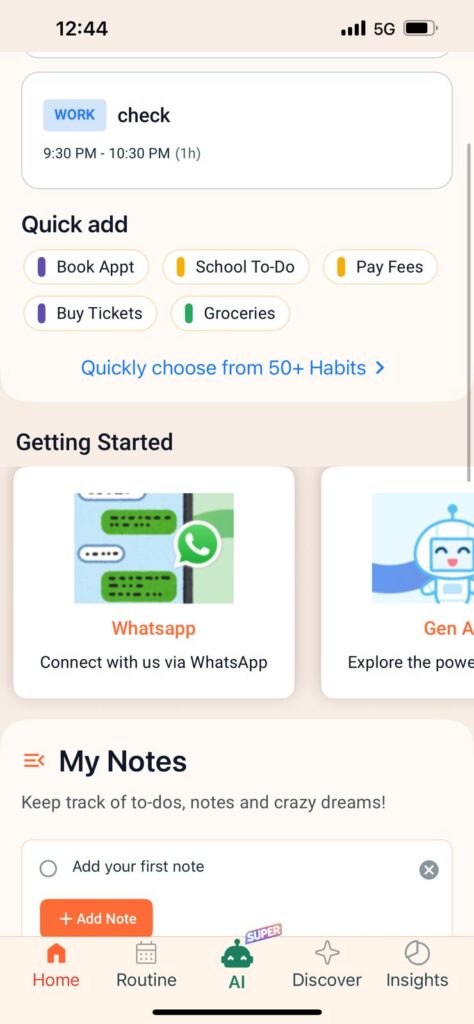
Your organizer should show tasks, events, and routines together in one visual schedule. This calendar-first design eliminates the need to mentally combine separate lists and calendars. When you open the app, you immediately understand what your day looks like and where you have flexibility.
Smart Reminders That Actually Work
Basic notifications are easy to ignore. Advanced organizers use multiple reminder channels—like WhatsApp integration—to ensure critical tasks don’t slip through the cracks. The reminders should be timely (such as 24 hours before plus 10 minutes prior) without becoming overwhelming or disruptive.
AI and Voice Input
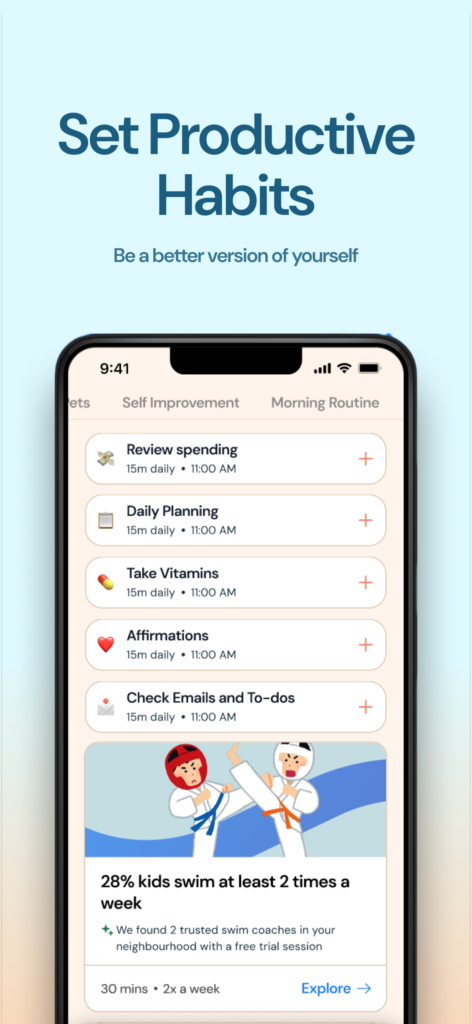
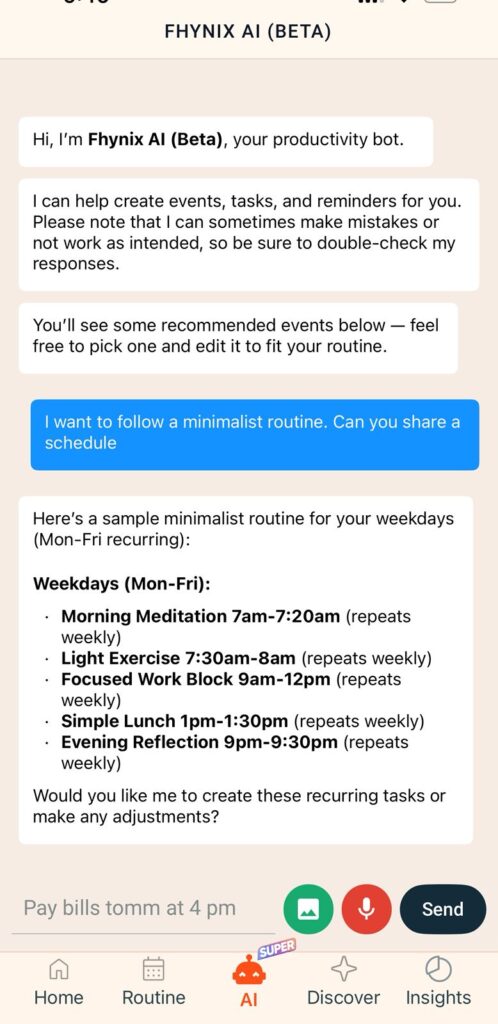
Typing out task details wastes time. Modern organizers let you speak or type naturally—”Submit assignment Friday 3 PM” or “Gym every Monday at 6 AM”—and the AI understands, schedules it correctly, and adds it to your timeline automatically.
Habit and Routine Tracking
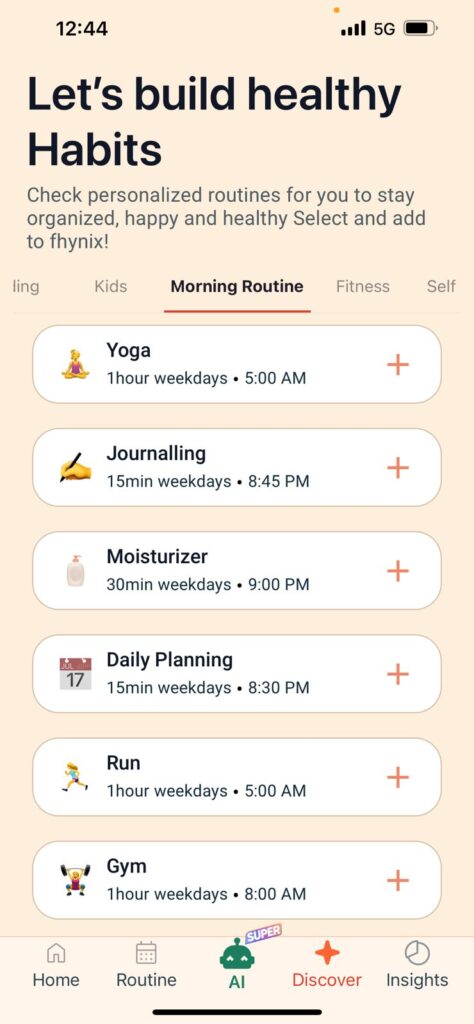
Building consistency requires more than scheduling one-time tasks. Your organizer should support recurring routines and track your progress over time. Whether it’s daily workouts, study sessions, or mindfulness practices, seeing your streaks and patterns helps maintain momentum.
Color-Coded Visual Clarity
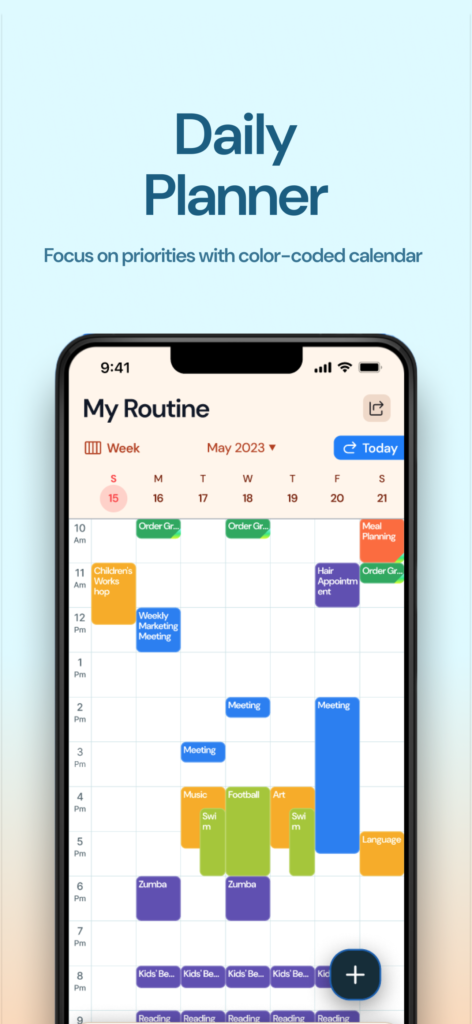
Quickly differentiate between work, personal, fitness, and family commitments without cluttering your interface. Color coding provides instant visual understanding, making your schedule easier to parse at a glance.
External Calendar Integration
Your organizer should connect seamlessly with Google, Microsoft, and Apple calendars. This ensures all your commitments appear in one place, regardless of where they originated. No more checking multiple apps to avoid scheduling conflicts.
Cross-Device Sync
Your schedule should be accessible everywhere—iPhone, iPad, Apple Watch, or web. Changes sync instantly across devices, so you always have the most current version of your plan.
Reflection and Notes
Planning isn’t just about doing—it’s also about learning. The ability to maintain simple reflection notes (without complex categories) helps you capture insights, track what’s working, and adjust your approach over time.
These features together create an organizer that doesn’t just store information but actively supports better planning habits and more effective time management.
How Fhynix Redefines iPhone Organization
Fhynix represents the next generation of iPhone organizers by fully embracing calendar-first design. Instead of separating tasks from your schedule, Fhynix brings everything into one unified timeline, making daily planning simpler and more intuitive.
From To-Do List to Timeline
Traditional organizers maintain separate task lists. Fhynix takes a different approach—your to-dos appear directly in your calendar timeline alongside events and routines. This eliminates the mental overhead of deciding when to do things because tasks are scheduled as you create them.
When you add a task to Fhynix, it becomes part of your daily flow immediately. You see it in context with everything else you need to do, making it easier to maintain balance and avoid overcommitting.
Natural Language Task Entry
Simply type or speak your tasks naturally: “Pay bills tomorrow at 4 pm” or “Team meeting every Thursday at 2 pm.” Fhynix’s AI processes your input and automatically schedules it with the correct date, time, and recurrence pattern. No manual date picking or form filling required.
This natural input method significantly reduces the friction of adding tasks, which means you’re more likely to capture everything important as it comes to mind.
WhatsApp Reminder Integration
Fhynix sends reminders via WhatsApp for calendar events, ensuring you never miss critical commitments. Because WhatsApp is already part of your daily communication flow, these reminders are harder to ignore than standard app notifications.
The default reminder logic sends an alert approximately 24 hours in advance, plus a final “10 minutes before” notification. This two-stage approach keeps tasks on your radar without overwhelming you with constant alerts.
Integrated Habit Building
Build consistency by tracking recurring routines directly in your calendar. Whether it’s morning workouts, study sessions, or evening reflection time, Fhynix shows these habits as part of your daily timeline and tracks your streaks over time.
The app provides productivity insights based on your completion patterns, helping you understand which habits are sticking and where you might need to adjust your approach.
Color-Coded Categories
Differentiate between work, personal, fitness, and family activities with automatic color coding. Your timeline becomes visually intuitive—you can understand your day’s balance without reading every item.
Seamless Calendar Integration
Connect Google, Microsoft, and Apple calendars so all your events appear in Fhynix’s unified view. This integration means you manage everything from one app rather than checking multiple calendars throughout the day.
Apple Watch Support
Quick glance at your timeline and upcoming tasks directly from your wrist. The Apple Watch integration ensures your schedule is always accessible, even when your phone isn’t handy.
Simple Reflection Notes
Maintain notes and reflections without complex categories or organizational overhead. The notes feature supports your planning by providing a space to capture thoughts, insights, and adjustments—keeping everything in one ecosystem.
Smart Bulk Entry
Upload images like holiday schedules or event flyers, and let Fhynix’s AI convert them into calendar events automatically. This bulk entry feature dramatically reduces the time spent manually inputting multiple dates.
By combining these features into one cohesive experience, Fhynix demonstrates what iPhone organization looks like when designed around how people actually plan their days—not around outdated app categories.
Why Students Love Calendar-First Organizers
Students face unique organizational challenges: varying class schedules, assignment deadlines, exam preparation, social commitments, and personal development goals. Traditional planners force them to juggle these across multiple apps or disconnected lists.
Calendar-first organizers like Fhynix solve this by showing everything in one timeline. Class schedules, assignment due dates, study blocks, and personal routines all appear together, making it easy to see when you’re overcommitted or have time for additional activities.
Managing Academic Schedules
Students can add recurring class schedules once and have them appear automatically throughout the semester. When assignment deadlines arise, they slot into the existing timeline, showing exactly when study time is available.
The voice input feature is particularly valuable for students—quickly add “History essay due next Friday” between classes without fumbling through menus or forms.
Building Study Habits
Consistent study routines matter more than cramming. Calendar-first organizers make it easy to schedule regular study blocks, track completion, and build sustainable learning habits. Seeing study sessions as time-blocked commitments (rather than abstract tasks) dramatically improves follow-through.
Balancing Life Beyond School
Students need more than academic management—they need to balance social life, exercise, hobbies, and rest. A unified timeline shows when you have free time for these activities and prevents academic commitments from crowding out wellbeing.
Many students use Fhynix’s habit tracking to maintain workout routines, mindfulness practices, or creative pursuits alongside their studies, creating a more balanced and sustainable lifestyle.
How Professionals Use iPhone Organizers Effectively
Professionals juggle meetings, project deadlines, focused work time, and personal commitments. The best iPhone organizers help them see all these pieces together, preventing work from consuming their entire schedule.
Unified Work and Personal Planning
Separating work and personal calendars creates blind spots. Calendar-first organizers show everything together (with color coding for visual distinction), ensuring you don’t double-book yourself or forget personal commitments while managing work responsibilities.
Time Blocking for Deep Work
Professionals increasingly use time blocking to protect focused work periods. By scheduling specific blocks for projects, they prevent meetings from fragmenting their entire day. Calendar-first organizers make this natural—focused work appears in the timeline just like any other commitment.
Managing Multiple Calendars
Many professionals need to coordinate across team calendars, client schedules, and personal commitments. Apps like Fhynix integrate external calendars so everything appears in one unified view, eliminating the need to check multiple sources before scheduling something new.
Smart Reminders for Important Deadlines
WhatsApp reminders ensure critical deadlines stay visible, even during busy workdays when app notifications might get lost in the noise. This multi-channel approach to reminders helps professionals stay on track without constant manual checking.
Building Better Habits With Your iPhone Organizer
Habit formation requires consistency, visibility, and tracking—all of which calendar-first organizers provide naturally. When your habits appear directly in your daily timeline, they become commitments rather than aspirations.
Scheduling Recurring Routines
Instead of hoping you remember your workout or meditation session, schedule it in your calendar. Fhynix allows recurring entries that appear automatically, making it easy to maintain consistency without daily decision-making.
Tracking Streaks and Progress
Seeing your completion streaks builds motivation. Calendar-first organizers track when you complete recurring routines and show your patterns over time. This visibility helps you understand what’s working and where adjustments are needed.
Balancing Different Life Areas
Effective habit tracking considers your entire life—work, health, relationships, and personal growth. When these habits appear together in your timeline, you naturally maintain better balance rather than overcommitting to one area.
Starting Small and Scaling Up
The best approach to habit building is starting with one or two routines and gradually adding more as they become automatic. Calendar-first design supports this by making it easy to add new recurring events without disrupting existing ones.
Maximizing Your iPhone Organizer’s Effectiveness
Having a great organizer app is only half the equation—using it consistently and strategically matters just as much. Here are proven approaches to get the most from your iPhone organizer:
Conduct Daily Reviews
Spend two minutes each morning or evening reviewing your timeline. This quick check prevents forgotten tasks, helps you mentally prepare for the day ahead, and allows you to adjust priorities based on energy levels or changing circumstances.
Prioritize Ruthlessly
Don’t overload your timeline with too many tasks. Each day, identify 2-3 essential items that truly matter. Everything else can be scheduled for later or eliminated entirely. This focus reduces overwhelm and improves actual completion rates.
Add Tasks Immediately
The moment something comes to mind, capture it in your organizer using voice or text input. Trying to remember tasks mentally creates stress and often leads to forgetting. Immediate capture ensures nothing slips through the cracks.
Schedule Breaks and Rest
Productivity isn’t about maximizing every minute—it’s about maintaining sustainable energy. Add breaks, meals, and downtime to your timeline. This prevents burnout and actually improves your effectiveness during focused work periods.
Use Color Coding Consistently
Establish a consistent color system and stick with it. For example: blue for work, green for personal, orange for fitness, purple for learning. Visual consistency makes your timeline instantly readable without requiring mental effort.
Review Weekly Patterns
At the end of each week, look at your completion patterns and insights. Which routines are you maintaining? Where are you overcommitted? What adjustments would improve next week? This regular review creates continuous improvement in how you plan.
Pair Digital With Offline Tools
If helpful, complement your iPhone organizer with simple offline aids like printable templates or paper notes. Some people find the combination of digital scheduling with physical reflection particularly effective.
These habits transform your organizer from a passive storage tool into an active system that continuously improves how you manage time, energy, and priorities.
Common Mistakes to Avoid With iPhone Organizers
Even with excellent tools, certain patterns can undermine effectiveness. Understanding these common pitfalls helps you avoid them:
Overloading Your Timeline
Adding too many tasks for one day creates stress and sets unrealistic expectations. Keep your schedule realistic and allow breathing room between commitments. Better to accomplish three important things than feel guilty about incomplete lists.
Using Multiple Disconnected Apps
Having separate apps for tasks, habits, events, and notes creates fragmentation. You waste time and mental energy switching contexts. A unified, calendar-first app like Fhynix keeps everything in one place, dramatically simplifying daily planning.
Ignoring Personal Time
Many people fill calendars with responsibilities but forget to schedule rest, hobbies, and self-care. A balanced timeline includes work, personal growth, relationships, and recovery. All are essential for long-term wellbeing and productivity.
Overcomplicating the Setup
Too many categories, labels, or organizational structures discourage daily use. Simplicity wins. A clean, minimalist setup that’s easy to understand and maintain will serve you better than elaborate systems that feel burdensome.
Failing to Update When Life Changes
Schedules evolve with new jobs, changing class schedules, shifting priorities, or life transitions. Failing to update your routines leads to outdated plans that no longer serve you. Regular reviews ensure your organizer stays relevant.
Treating Tasks as Permanent
Not everything on your list deserves completion. Regularly review tasks and eliminate those that are no longer relevant, important, or aligned with current priorities. Permission to delete tasks is just as important as adding them.
By avoiding these patterns, you ensure your iPhone organizer remains a helpful tool that adapts to your life rather than creating additional stress or rigidity.
Who Benefits Most From Calendar-First iPhone Organizers
While anyone can benefit from better organization, certain groups find calendar-first approaches particularly transformative:
Students and Academic Professionals
Managing classes, assignments, study time, and personal life requires seeing everything together. Calendar-first design prevents academic commitments from overwhelming other life areas while ensuring nothing important gets missed.
Freelancers and Entrepreneurs
Without fixed schedules, freelancers need clear boundaries between client work, business development, and personal time. A unified timeline helps maintain balance and prevents work from consuming every available moment.
Parents and Caregivers
Coordinating family schedules, school activities, medical appointments, and personal commitments requires visibility across multiple people’s needs. Shared calendar features help families stay coordinated without constant checking in.
People Building New Habits
Whether improving fitness, learning skills, or establishing better routines, habit formation requires consistent scheduling and tracking. Calendar-first organizers make habits visible and trackable without requiring separate habit apps.
Anyone Feeling Overwhelmed
If you constantly feel behind, forget commitments, or struggle with work-life balance, a calendar-first organizer provides clarity. Seeing everything in one timeline reduces mental clutter and creates a sense of control over your schedule.
Individuals With ADHD
Visual timelines, smart reminders, and unified scheduling particularly benefit people with ADHD who struggle with traditional list-based planning. Specialized tools designed for ADHD often incorporate these calendar-first principles.
The Future of iPhone Organization in 2026 and Beyond
The evolution of iPhone organizers reflects broader shifts in how we think about productivity and time management. Moving forward, expect these trends to accelerate:
Increased AI Integration
AI will handle more scheduling decisions automatically—suggesting optimal times for tasks based on your patterns, energy levels, and existing commitments. Natural language processing will become even more sophisticated, understanding context and nuance in how you describe tasks.
Unified Ecosystems
The distinction between task managers, calendars, habit trackers, and note apps will continue to blur. Users want integrated systems rather than specialized tools that require constant switching.
Smarter Reminder Systems
Multi-channel reminders (like WhatsApp integration) will become standard, ensuring important tasks reach you through channels you actually check rather than relying solely on app notifications.
Better Balance Metrics
Future organizers will provide insights not just about productivity but about balance—tracking whether you’re scheduling adequate rest, personal time, and growth activities alongside work commitments.
Enhanced Collaboration Features
Shared timelines and family coordination features will improve, making it easier for groups to plan together without losing individual scheduling control.
Calendar-first design represents where organization tools are heading—away from fragmented specialized apps toward unified systems that match how people actually experience their days.
Making Organization a Habit, Not a Chore
The best iPhone organizer is one you actually use consistently. Here’s how to ensure your planning system becomes a sustainable habit:
Start with a simple daily routine: check your timeline each morning, add tasks as they arise throughout the day, and do a quick review each evening. These three touchpoints take less than five minutes total but dramatically improve planning effectiveness.
Focus on consistency over perfection. Your organizer doesn’t need to be meticulously detailed or perfectly organized—it needs to accurately reflect your commitments and support your follow-through. Done is better than perfect.
Celebrate small wins. When you maintain a habit streak, complete a challenging project, or successfully balance a busy week, acknowledge it. These positive associations make planning feel rewarding rather than burdensome.
Adjust as needed. Your planning system should evolve with your life. What works during one season might need modification later. Give yourself permission to experiment and adapt.
Conclusion: Choosing Your iPhone Organizer for 2026
In 2026, effective organization isn’t about managing complexity—it’s about creating clarity. The best free iPhone organizer apps accomplish this by taking a calendar-first approach, showing your tasks, events, and routines together in one unified timeline.
Tools like Fhynix represent this new standard by eliminating the artificial separation between task lists and calendars. When your to-dos appear directly in your daily schedule, planning becomes intuitive rather than overwhelming. Add smart features like AI-assisted input, WhatsApp reminders, habit tracking, and external calendar integration, and you have a complete planning system that actually supports how you live.
The right organizer doesn’t just store information—it helps you build better habits, maintain balance across life areas, and stay consistent with what matters most. Whether you’re a student managing classes and personal growth, a professional balancing work and life, or anyone looking to feel more in control of your time, a calendar-first daily planner can transform how you approach each day.
Start by trying a unified organizer like Fhynix and experiencing how much simpler planning becomes when everything lives in one visual timeline. Your 2026 can be more organized, balanced, and productive—with less stress and more clarity about what truly matters.