

Every student knows the feeling. It’s Sunday evening, exams are two weeks away, and you’re staring at a blank notebook trying to figure out how to fit everything in. You sketch out a rough study schedule, feel briefly organised, and then — by Wednesday — the whole thing has fallen apart because life happened and the plan wasn’t built to handle it.
The problem isn’t discipline. It’s the tool. A study schedule written on paper or buried in a notes app doesn’t adapt when things shift, doesn’t remind you at the right moment, and doesn’t show you how studying fits into the rest of your day. Fhynix takes a different approach: your study blocks live inside a unified calendar timeline alongside your classes, habits, and personal commitments — so you always have a complete picture of your week, not just a wishful list.
Here’s how to build a study schedule that actually works, and why the right app makes all the difference.
Why Most Study Schedules Fail Before the Week Is Out
The honest answer is that most study schedules are built in isolation. You plan your revision without accounting for the social lunch on Tuesday, the gym session you always do on Thursday, or the fact that you’re genuinely exhausted by 9 pm and can’t absorb anything after that.
A good study schedule isn’t just a list of subjects mapped to time slots. It’s a realistic plan that sits inside your actual life — one that accounts for energy levels, existing commitments, and the buffer time you need between heavy sessions. When your study plan is integrated into your full daily calendar, those conflicts become visible before they derail you.
That’s the shift Fhynix makes possible. Instead of maintaining a separate study planner alongside your calendar, everything — lectures, deadlines, study blocks, habits, reminders — lives in one unified timeline. You can see at a glance that Tuesday is already packed and Wednesday afternoon is genuinely free, which means that’s where the three-hour chemistry revision session should go.
What a Strong Study Schedule Actually Looks Like

Before building your schedule, it’s worth being clear on what you’re actually designing. A strong study schedule has a few non-negotiable elements:
- Subject-specific time blocks rather than vague “study time” slots that you’ll fill with the easiest thing rather than the most important
- Spaced repetition built in — returning to material over several shorter sessions rather than cramming everything into one long one
- Buffer time between sessions so your brain has room to consolidate what it’s taken in
- Deadline visibility across the full week and month so nothing sneaks up on you
- Consistent daily anchors — fixed times you always study, which become habits rather than decisions you have to make each day
The last point is particularly important. The research on habit formation is clear: when studying happens at the same time in the same context, the decision fatigue around getting started shrinks significantly. Fhynix supports this by letting you set recurring study blocks that appear in your calendar timeline every day or every week automatically — no re-entering, no forgetting.
How to Build Your Study Schedule in Fhynix
Step 1: Add Your Fixed Commitments First
Before you block out study time, add everything that’s already locked in — lectures, tutorials, part-time work shifts, sports practice, family commitments. Fhynix syncs with Google, Apple, and Microsoft calendars, so if your university timetable is already in Google Calendar, it comes in automatically. You’ll immediately see which windows are actually free.
Step 2: Identify Your Peak Energy Windows
Look at your typical day honestly. If you’re sharpest between 9 am and noon, that’s where your most demanding subjects should go. If you hit a wall after lunch, that’s a good time for lighter review tasks or administrative study work like organising notes. Fhynix’s colour-coded calendar view makes it easy to block these windows visually by subject or priority — so your hardest material always gets your best hours.
Step 3: Add Study Blocks Using Voice or Text Input
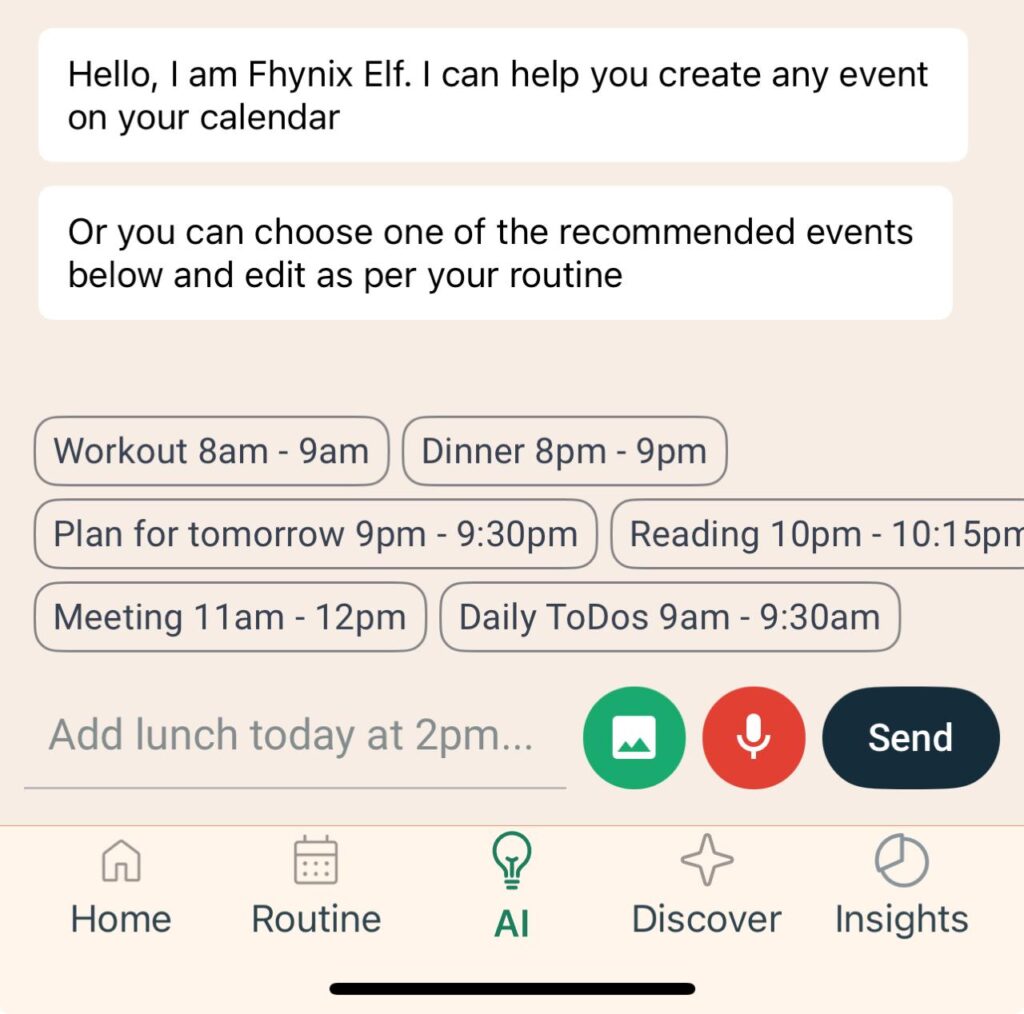
This is where Fhynix’s natural language input saves time. Instead of navigating menus, you can type or say something like “two hours of maths revision every weekday at 10 am” and the app places it directly in your calendar timeline. For one-off sessions tied to specific deadlines, you might say “history essay prep on Thursday at 2 pm” — and it lands exactly where you need it.
You can also upload images — a printed exam timetable, a course outline, a syllabus — and Fhynix’s AI converts them into calendar events automatically. If your university gives you a PDF schedule at the start of term, you don’t have to manually re-enter every date.
Step 4: Set Reminders That Actually Reach You

This is where a lot of study apps fall short. A notification that appears on a locked screen while you’re in class does nothing. Fhynix sends reminders via WhatsApp — 24 hours before a study session or deadline, plus a 10-minute alert — which means the reminder lands somewhere you’re actually checking. For students who are already in WhatsApp constantly, this is a genuinely useful feature rather than a gimmick.
Step 5: Do a Weekly Review Every Sunday
Spend 15–20 minutes at the end of each week looking ahead. Check which deadlines are coming up, confirm your study blocks are in the right places, and adjust anything that shifted during the week. Fhynix’s calendar view makes this quick because you can see the full week at once rather than scrolling through a list.
For students managing multiple subjects and commitments, the best student planner apps guide is a helpful reference for comparing approaches.
Study Schedule: Subject Allocation Framework
One of the most common questions students ask is how to divide their study time across subjects. There’s no universal answer, but this framework is a useful starting point:
| Subject Priority | Recommended Weekly Hours | Suggested Session Length | Best Time of Day |
|---|---|---|---|
| High difficulty / upcoming exam | 6–8 hours | 90 minutes with breaks | Morning (peak energy) |
| Medium difficulty / ongoing coursework | 3–5 hours | 60 minutes | Mid-morning or early afternoon |
| Low difficulty / revision and review | 1–3 hours | 45 minutes | Afternoon or early evening |
| Admin (notes, reading, research) | 1–2 hours | 30–45 minutes | Post-lunch or evening |
Use this as a flexible guide rather than a rigid rule. During exam periods, high-difficulty subjects should absorb more of your available hours. In quieter weeks, lighter review sessions keep material fresh without overloading your schedule.
Who Benefits Most From a Structured Study Schedule?
A properly built study schedule isn’t just for exam season — it’s a useful structure for anyone managing multiple competing demands on their time.
- University students balancing lectures, assignments, part-time work, and social lives need a system that makes the available windows obvious. Having study blocks in the same view as everything else removes the guesswork.
- School students preparing for standardised tests or final exams benefit from the spaced repetition approach that a weekly recurring schedule naturally produces.
- Students with ADHD or attention challenges often find that having a visual, colour-coded calendar with external reminders (especially WhatsApp alerts) significantly reduces the friction around getting started. The how to plan effectively with ADHD guide explores this in more detail.
- Postgraduate and professional students managing study alongside full-time work need tight scheduling and reliable reminders — both of which Fhynix handles well.
Fhynix Study Schedule Feature Overview
| Feature | How It Helps Students |
|---|---|
| Voice and text task entry | Add study blocks quickly without breaking your flow |
| Recurring calendar events | Set weekly study sessions once; they appear automatically |
| Colour-coded timeline view | Separate subjects visually for quick reference |
| WhatsApp reminders | Get alerts 24 hours and 10 minutes before sessions or deadlines |
| External calendar sync | Pull in university timetables from Google, Apple, or Microsoft |
| Image-to-event conversion | Upload printed schedules; AI converts them to calendar entries |
| Unified to-do and calendar view | Deadlines and tasks live alongside events — nothing in a separate list |
| iOS and Android support | Full-featured on both platforms |
Tips for Making Your Study Schedule Stick

Building the schedule is only half the work. Sustaining it is where most students struggle. A few things that genuinely help:
- Start smaller than you think you need to. It’s better to consistently hit a 60-minute session than to plan 3 hours and do none of it. Build up gradually.
- Treat study blocks like lectures. You wouldn’t skip a class without reason. Apply the same logic to blocked study time.
- Use the 10-minute start rule. Tell yourself you’ll study for just 10 minutes. Getting started is the hardest part; once you’re in, you’ll usually keep going.
- Review what you planned vs. what you actually did. Fhynix’s calendar view makes this honest — if the blocks are there and you skipped them, you’ll see it. Adjust the plan rather than abandoning it.
- Don’t schedule study into every available gap. White space matters. Unscheduled time is not wasted time; it’s recovery time that keeps the rest of the schedule sustainable.
If you’re looking to understand how habits and routines around studying can be built more systematically, the how long does it take to form a habit article is worth a read alongside your planning.
FAQs About Study Schedules
One More Thing Worth Knowing
If you’re evaluating which calendar-based planner works best for your study needs, it’s useful to look at what different tools prioritise. For a broader comparison of planning apps with strong calendar features, the 5 Skylight Calendar alternatives roundup gives a solid overview of what’s available and how Fhynix fits into the landscape.
The Bottom Line
A study schedule only works when it’s realistic, visible, and connected to everything else going on in your life. That means it can’t live in a separate notebook or a to-do list app that you check once and forget. It needs to be part of your daily calendar — where it competes for time honestly alongside everything else and shows you exactly what each week actually looks like.
Fhynix makes this possible with a calendar-first design that puts study blocks, deadlines, habits, and reminders in one unified timeline. Add in voice input for quick entry, WhatsApp alerts that actually reach you, and recurring sessions that set themselves, and you have a study planning system that’s genuinely easier to stick to — not just easier to set up.
Start with one week. Build the schedule, trust the reminders, and do the Sunday review. By week three, it won’t feel like a system anymore — it’ll just feel like how you study.