When it comes to organizing your daily life, you’ve probably heard of Todoist—one of the most popular task management apps with millions of users worldwide. But if you’re someone who finds traditional to-do lists overwhelming or disconnected from your actual schedule, you might be wondering if there’s a better way to plan your day.
That’s where the fundamental difference between task-list apps and calendar-first planners becomes important. While Todoist excels at helping you capture and organize tasks, Fhynix takes a different approach by integrating your to-dos directly into your calendar timeline, creating one unified view of your entire day.
The Traditional To-Do List Approach: Todoist
Todoist has built its reputation on being one of the most powerful and flexible task management systems available. The app allows you to create projects, organize tasks with labels and filters, set priorities, and track your productivity through detailed statistics.
The core philosophy behind Todoist is task capture and organization. You add tasks to various projects, assign due dates, set priorities, and then work through your lists. The app’s strength lies in its organizational capabilities—you can create complex hierarchies of tasks, use natural language input for dates, and access your lists across virtually any device or platform.
Many productivity enthusiasts appreciate Todoist’s karma system, which gamifies task completion, and its powerful filtering capabilities that let you create custom views of your work.
Fhynix’s Calendar-First Philosophy: Why It Matters

Fhynix operates on a fundamentally different principle: your day unfolds in time, not in lists. Instead of maintaining separate to-do lists that you check independently, Fhynix brings your tasks directly into your calendar timeline alongside your meetings, appointments, and events.
This means when you look at your day in Fhynix, you see everything at once—the dentist appointment at 2 PM, the team meeting at 3 PM, and the task to finish that report, all in the context of your actual available time. This calendar-first approach helps you plan more realistically because you’re not just making lists of what you need to do—you’re seeing when you’ll actually have time to do it.
Feature Comparison: Todoist vs Fhynix
| Feature | Todoist | Fhynix |
| Core Philosophy | Task-list organization | Calendar-first with integrated tasks |
| Task Entry | Text with natural language dates | Text, voice notes, AI interpretation |
| Calendar View | Separate add-on view | Primary interface with tasks included |
| Task Scheduling | Due dates without specific times | Tasks appear in calendar timeline with times |
| Voice Input | Not available | Full voice note support with AI processing |
| WhatsApp Integration | Not available | Calendar event reminders via WhatsApp |
| External Calendar Sync | Limited | Full sync with Google, Microsoft, Apple calendars |
| Habit Tracking | Through recurring tasks | Dedicated habits and routines features |
| Color Coding | Labels and priority colors | Color-coded categories for life areas |
| Platform Support | All platforms (desktop, mobile, web) | Mobile-first (iOS, Android) with Apple Watch |
| Smart Scheduling | Manual date assignment | AI-powered task placement in timeline |
| Image Upload | File attachments | AI converts schedule images to calendar entries |
The Problem with Separate To-Do Lists
Here’s a scenario that many Todoist users experience: You open your task list in the morning and see 20 items due today. You feel motivated and ready to tackle them. But then you check your calendar and realize you have back-to-back meetings from 9 AM to 3 PM, leaving only scattered pockets of time.
Suddenly, those 20 tasks feel impossible. You start the day feeling behind before you’ve even begun.
This disconnect between task lists and actual available time is why Fhynix embraces the philosophy that to-dos are now part of your calendar timeline. When you add a task in Fhynix, you’re not just adding it to an abstract list—you’re placing it in your actual day, seeing it alongside everything else competing for your time.
How Voice and AI Change Task Management
While Todoist offers natural language processing for due dates (like “tomorrow at 5pm”), Fhynix extends this concept with full voice note support. You can simply say “Pay bills tomorrow at 4 pm” and the app understands both what you need to do and when you plan to do it, placing it directly on your calendar.
This approach to how to make a to-do list feels more natural than typing tasks into categories or projects. You’re planning your day the way you’d explain it to a friend, and the app handles the organization automatically.
Fhynix also supports uploading images—like school schedules, holiday calendars, or event posters—and the AI converts them into calendar entries. This bulk entry feature saves significant time compared to manually typing each event.
WhatsApp Reminders: Meeting Tasks Where You Are

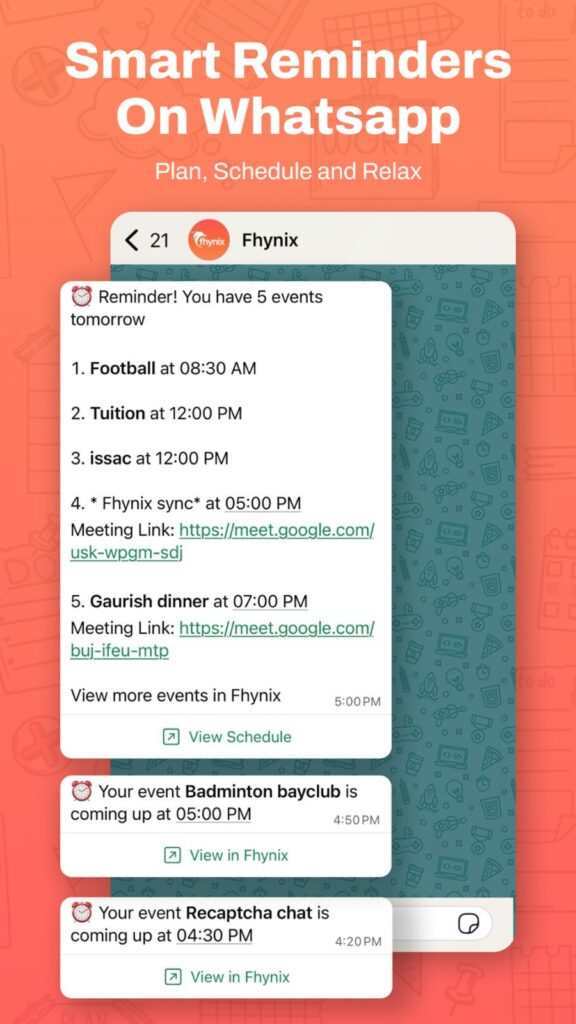
One of Fhynix’s most praised features is its WhatsApp reminder integration for calendar events. The app sends reminders via WhatsApp—typically 24 hours before an event plus a 10-minute warning—ensuring you stay connected to your schedule even when you’re not actively using the planning app.
This feature recognizes that most people spend significant time on messaging apps. By bringing reminders to WhatsApp, Fhynix meets you where you already are, rather than requiring you to constantly check a separate productivity app.
Users consistently highlight this feature as a game-changer. As one review noted, the WhatsApp reminders are “super unique and actually keep me on track,” providing accountability without requiring you to change your daily habits.
Managing Multiple Life Areas

Todoist handles multiple areas of life through its projects and labels system. You might have projects for “Work,” “Personal,” “Home,” and “Fitness,” each with their own tasks. While this provides excellent organization, you still need to mentally piece together how all these different areas fit into your actual day.
Fhynix’s color-coded calendar automatically shows how your different life areas intersect in time. You can see at a glance when your work tasks, family commitments, fitness routines, and personal appointments are happening, making it easier to maintain balance and avoid overcommitting.
This makes Fhynix particularly effective as one of the best shared calendar apps for families who need to coordinate multiple schedules in one place.
Habits and Routine Building

Todoist approaches habits through recurring tasks that appear on your list regularly. You complete them, they disappear, and they return based on your schedule. It’s effective but treats habits the same as any other task.
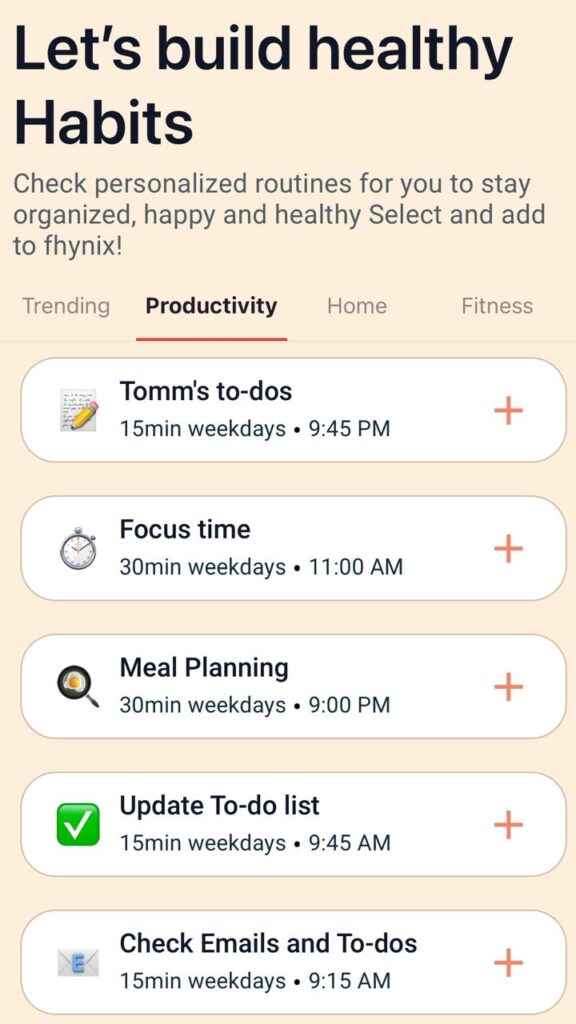
Fhynix offers dedicated habit tracking features that recognize the difference between completing a one-time task and building lasting routines. The app provides productivity insights and trends, helping you understand your patterns over time and actually build better habits rather than just checking them off a list.
For anyone interested in creating effective daily routines, this distinction matters significantly.
The Mobile-First Experience
Todoist works well across all platforms, which is one of its strengths. However, Fhynix is specifically optimized for mobile-first usage, recognizing that most people need to check and update their schedules on the go.
With support for iOS, Android, and Apple Watch, Fhynix ensures you can see your complete daily timeline wherever you are. The Apple Watch integration is particularly useful for quick glances at upcoming events and tasks without pulling out your phone.
Time Blocking vs Task Lists
One of the most significant differences between these approaches is how they handle time. Todoist users often manually implement time-blocking techniques, creating calendar events for their tasks to ensure they actually have time to complete them. This requires maintaining both a task list and a calendar, essentially doing double work.
Fhynix eliminates this duplication by making time-blocking the default. When you add a task, you’re inherently placing it in time, seeing exactly when it fits among your other commitments. This approach aligns with best practices for time blocking without requiring extra effort or system maintenance.
Who Should Choose Todoist?
Todoist remains an excellent choice if you:
- Prefer traditional task-list organization with projects and sub-tasks
- Need complex filtering and organizational capabilities
- Want cross-platform support including extensive desktop and web features
- Value detailed productivity statistics and gamification
- Work primarily with tasks that don’t need specific time slots
- Need advanced collaboration features for team task management
Who Should Choose Fhynix?
Fhynix is ideal for people who:
- Want tasks integrated directly into their daily calendar timeline
- Prefer mobile-first planning with on-the-go access
- Value voice input and AI-powered natural language processing
- Need WhatsApp reminder integration for calendar events
- Manage multiple life areas and want to see them color-coded in one view
- Want to build habits and track routines alongside scheduling
- Feel overwhelmed by long task lists disconnected from actual time
- Need to sync multiple external calendars into one unified view
If you’re specifically looking for the best to-do app that integrates tasks with calendar, Fhynix’s unified approach eliminates the gap between planning and scheduling.
The Integration Advantage
While Todoist offers calendar integration as an add-on feature, Fhynix is built from the ground up around calendar integration. The app syncs seamlessly with Google Calendar, Microsoft Calendar, and Apple Calendar, bringing all your existing events into the unified view alongside your tasks.
This means you’re not starting from scratch—your existing calendar commitments automatically appear in Fhynix, and you simply add your tasks around them.
Making the Switch: What to Consider
If you’re contemplating moving from a task-list approach to calendar-first planning, consider how you currently use your planner. Do you find yourself constantly wondering when you’ll actually complete your tasks? Do you feel like your to-do list and calendar live in separate worlds?
These are signs that a calendar-first approach might better serve your needs. The shift from “what do I need to do?” to “when will I do it?” can fundamentally change how realistic and achievable your daily plans feel.
Frequently Asked Questions
Can I import my Todoist tasks into Fhynix?
While there’s no direct import feature, you can manually add your important tasks to Fhynix. The voice and AI features make bulk entry faster than traditional typing. Focus on importing only your current and upcoming tasks rather than your entire historical task database.
Does Fhynix have sub-tasks and project organization like Todoist?
Fhynix focuses on calendar-based organization rather than project hierarchies. Tasks are organized by time and life area rather than by project structure. This works well for personal planning but may feel different if you’re used to complex project management features.
Can I use Fhynix for work and personal life simultaneously?
Yes, this is one of Fhynix’s strengths. The color-coded categories help you distinguish between work, personal, fitness, and family commitments while seeing everything in one unified calendar timeline.
Will I lose the ability to filter tasks like in Todoist?
Instead of filtering tasks, Fhynix uses the calendar timeline itself as the organizational structure. You see tasks by when they’re happening and can view specific life areas through color coding. It’s a different paradigm focused on time rather than categories.
Does Fhynix work offline?
Yes, Fhynix supports offline functionality on Android, allowing you to add tasks and events without internet connection. Changes sync automatically when you’re back online.
Is the AI scheduling reliable for daily planning?
The AI features continue to evolve and work well for natural language task entry. Users report that the voice note interpretation is particularly effective, making it feel conversational to add tasks. The AI improves with clear, specific task descriptions.