
If you’ve searched for “work tracker” recently, you’ve probably seen the same tools recommended everywhere: Toggl, Clockify, Harvest, Jibble. They all promise to “revolutionize your productivity,” but here’s what most articles won’t tell you: the best work tracker isn’t the one with the most features — it’s the one you’ll actually remember to use.
Freelancers know this better than anyone. Unlike traditional employees who clock in and out, freelancers juggle multiple clients, projects, and pricing models. Some bill hourly. Others charge fixed rates but still need to track time to ensure they’re not undercharging.
This guide looks at what real freelancers say on Reddit about work tracking tools — what actually works, what becomes another abandoned app, and why the simplest solution often beats the fanciest dashboard.
Why Most People Start Tracking Work (And Why They Stop)
The pattern shows up repeatedly in freelancer discussions: someone downloads a time tracker, uses it religiously for two weeks, then quietly abandons it.
Here’s what usually happens:
They realize their fixed rates are too low — One freelancer explained: “For the longest time, I charged clients per output, a fixed rate based on gut feel and rough estimates. It worked… until I started questioning whether those numbers actually justify the real effort and time needed.”
Tracking exposes the truth: that “quick” blog post actually takes three hours when you include research, writing, editing, and revisions.
They forget to start/stop timers — Manual tracking requires discipline most people don’t have. You finish a task, move to the next one, and realize two hours later you never stopped the previous timer.
The app becomes another task to manage — When updating your time tracker feels like extra work, it’s the first thing you abandon when busy.
Free plans hit limitations quickly — Many tools advertise “free plans” but lock essential features like billable rates, detailed reports, or invoicing behind paywalls.
The best work tracker reduces friction instead of adding to it.
What Freelancers Actually Want from a Work Tracker
Based on Reddit discussions and real user experiences, here’s what matters:
- Accurate time capture without constant babysitting — Whether through automatic tracking, easy manual edits, or forgiving timers, the system should work even when you forget.
- Clear project and client breakdowns — Seeing where time goes across different clients or projects helps justify pricing and identify time sinks.
- Exportable reports — When it’s time to invoice or review your month, you need clean data you can actually use.
- Cross-device syncing — Freelancers work on laptops, phones, and tablets. Your tracker should follow you seamlessly.
- Free plans that actually work — Not “free trials” disguised as free plans. Genuinely useful features without constant upsell prompts.
For those exploring how to manage time as busy professionals, the right work tracker becomes invisible — capturing data without demanding constant attention.
Work Tracker Options (What Real Freelancers Actually Use)
Let’s break down what people recommend based on actual usage, not marketing promises.
Fhynix — Simple Task and Time Management Without Timers
Best for: People who want to track what they accomplish without managing timers
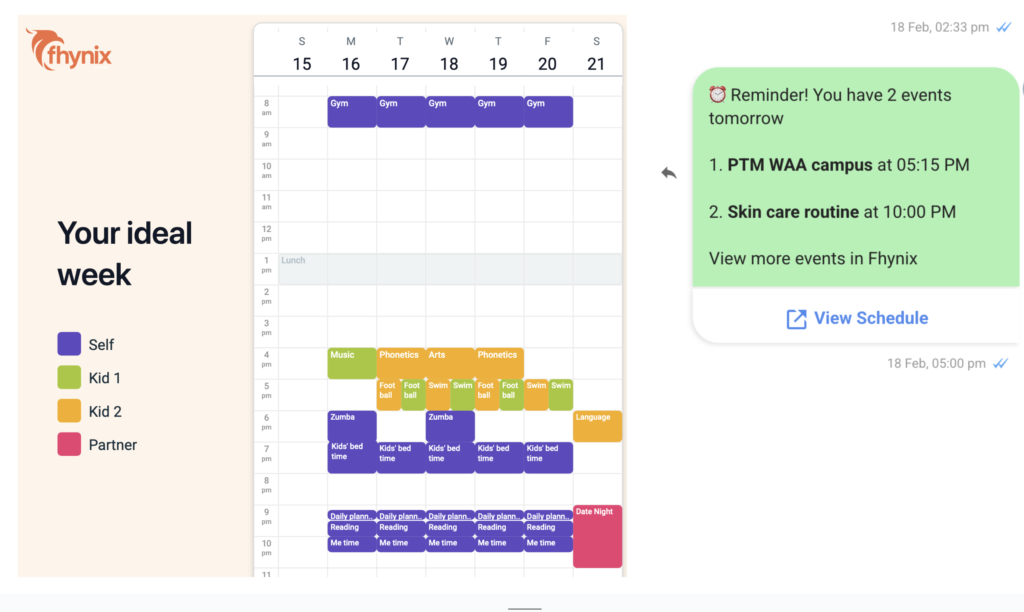
While most work trackers focus on start/stop timers, Fhynix takes a different approach by integrating task management with your daily schedule.
What makes it different:
- Natural task entry — Add tasks by typing or voice without forms or complex setups
- Calendar-based timeline — See your work in context of your day, not just isolated time entries
- WhatsApp reminders — Get notifications where you actually check messages
- Simple rescheduling — When priorities shift, adjusting is quick
Unlike traditional time trackers that require remembering to start and stop timers, Fhynix focuses on what you plan to do and helps you stay on track. This works well for freelancers who charge fixed rates but still want structure around their workday.
One Reddit user mentioned switching from rigid time-blocking apps: “I started using Fhynix because you can add your plans easily just by speaking or typing, and changing things is simple even when your day doesn’t go as expected.”
For professionals seeking best daily routine applications that don’t require constant timer management, Fhynix offers organization without overhead.
Jibble — Generous Free Plan for Project Tracking
Best for: Freelancers who want full features without paying
Jibble consistently gets mentioned as the most generous free work tracker.
What users love:
- Complete feature access on free plan (GPS, timesheets, task/project breakdowns)
- Works across mobile, desktop, and browser
- Clean, exportable reports
- Real-time syncing
One freelancer explained: “What made me stick with it is the project/task breakdowns, real-time sync across devices, and exportable reports. All on the free plan.”
Another added: “I love having that overview for myself. And the mobile app is a huge plus as well!”
The downsides:
- Browser extension only on Chrome
- Can feel like overkill for solo work
- Learning curve if you want advanced features
Jibble works brilliantly if you need detailed tracking across multiple projects and clients without hitting paywalls.
Toggl Track — Beautiful Interface with Paywall Limitations
Best for: People who prioritize user experience and don’t mind paying eventually
Toggl appears in almost every work tracker discussion because the interface is genuinely pleasant to use.
Strengths:
- Intuitive, beautiful design
- Calendar view for visualizing time
- Easy manual edits when you forget timers
- Integrates with practically everything
Limitations:
- Reporting locked behind paid plans
- $9/month feels steep for solo freelancers who just need insights
- Some mobile app bugs reported
One user summed it up: “Toggl feels great to use. But once I needed more insights or reporting, I hit the paywall.”
For basic time tracking, Toggl’s free plan works fine. But if you’re serious about analyzing where time goes, you’ll need to upgrade.
Clockify — Reliable Desktop Option with Mobile Issues
Best for: Desktop-focused workers who don’t rely heavily on mobile
Clockify offers a genuinely generous free plan with unlimited users and projects.
What works:
- Very generous free tier
- Easy task breakdown within projects
- Pomodoro mode included
- Good integrations
What doesn’t:
- Mobile app reported as buggy
- Slower syncing than competitors
- UI functional but not smooth
Multiple users mentioned: “Clockify is reliable and flexible, but the mobile experience gave me a headache.”
If you work primarily on desktop and want straightforward tracking without cost, Clockify delivers. Just don’t expect a great mobile experience.
Harvest — Invoicing Built In, But Feels Dated
Best for: Freelancers who want tracking and invoicing in one place
Harvest combines time tracking with built-in invoicing, which sounds perfect for freelancers.
Advantages:
- Built-in invoice creation
- Project budgets
- Timer reminders
- Simple layout
Drawbacks:
- Feels dated compared to newer tools
- Clunky sync between devices
- Lacks modern automation features
- Recent massive price increases (800%+ reported)
One user who chose Harvest explained: “I wanted one app where I could input my time on a project… and most importantly, I wanted those hours to get converted to an invoice all in one place.”
However, another warned: “Harvest – because they have put up pricing from Jan 2026 to between 800% and 5500%.”
Harvest works if invoicing integration is essential, but watch the pricing carefully.
Manual Tracking: Spreadsheets and Notebooks
Best for: People who find all apps distracting
Don’t overlook simple solutions. Several freelancers mentioned tracking time in:
- Excel/Google Sheets — Custom columns for date, client, task, hours, rate
- Notebooks — Physical time logs with pen and paper
- Email to self — Using subject lines as task names, replies as time updates
One user detailed their spreadsheet approach: “I have a spread sheet with the following headers across the columns: date, task or request, next steps.”
The benefit? Zero learning curve, complete control, no subscription fees. The downside? No automation, harder to generate reports, easy to lose data.
For those exploring time management tools and techniques to plan smarter, sometimes the analog approach reduces digital overwhelm.
Why Freelancers Actually Track Time
Understanding why you’re tracking time shapes which tool you should choose.
- To justify fixed-rate pricing — “I started to track everything, not to bill hourly, but to back up the fixed rate that I quote.” This is the most common reason. Tracking reveals whether your $50 blog post quote actually covers the three hours of work involved.
- To identify time sinks — “Tracking’s eye opening for quotes, mine crept up 20% after seeing edit sinks.” You discover that “quick revisions” consistently eat 30% more time than expected.
- For client invoicing — “End of month I only send the invoice for the X amount of billable hours per client.” Hourly billing requires precise tracking.
- To separate billable vs. non-billable work — Administrative tasks, emails, and project management often aren’t billable but still consume significant time.
- For personal productivity insights — Understanding your own work patterns helps optimize when you do focused work vs. administrative tasks.
The clearer your purpose, the easier it is to choose the right tool.
What Most Articles Get Wrong About Work Trackers
Here’s what freelancers wish people understood:
- Automatic tracking sounds great but often fails — Tools that promise to track everything automatically usually require constant corrections. One user noted about AI-powered trackers: “I would be very worried about privacy & safety. It’s basically an AI keylogger.”
- More features ≠ better — The tracker with the longest feature list often becomes the one you abandon fastest. Simplicity beats comprehensiveness.
- Free plans have hidden limitations — Many “free” tools lock billable rates, client management, or exports behind paywalls. Always check what’s actually included.
- Mobile apps matter more than you think — Freelancers work from coffee shops, co-working spaces, and client offices. If the mobile app is buggy, you’ll stop using it.
- Forgetting to track is the real problem — The best tracker isn’t the most accurate — it’s the one that’s forgiving when you forget to start or stop timers.
For those managing multiple responsibilities, exploring best ADHD time management tools reveals strategies that work even when focus is challenging.
Choosing the Right Work Tracker for Your Situation
Here’s how to decide:
If you bill hourly and need detailed invoices:
→ Harvest (if you can afford it) or Jibble (free alternative)
If you charge fixed rates but want to validate pricing:
→ Toggl (simple) or Clockify (more features)
If you forget to start/stop timers constantly:
→ Fhynix (task-based approach) or tools with generous manual editing
If you need GPS tracking for field work:
→ Jibble (includes GPS on free plan)
If you want the simplest possible solution:
→ Spreadsheet or notebook
If budget is tight:
→ Clockify or Jibble (most generous free plans)
The “best” work tracker depends entirely on your workflow, client requirements, and whether you actually remember to use it.
When to Stop Using Work Trackers
Sometimes the answer isn’t finding a better tool — it’s realizing you don’t need one.
Consider dropping your work tracker if:
- You have consistent fixed-rate projects with stable time requirements
- Tracking creates more stress than insight
- You’re spending more time managing the tracker than working
- Your pricing is already profitable and sustainable
One freelancer’s insight applies here: “I always end up putting more time than I want into managing the task management structure itself rather than the task.”
Work tracking should serve your business, not become your business.
Final Thoughts
The best work tracker is the one that captures accurate data without demanding constant attention.
For some, that’s Jibble with automatic syncing. For others, it’s Toggl’s beautiful interface despite the paywall. For many, it’s Fhynix’s task-based approach that doesn’t require timer babysitting.
Start with your existing tools. Try Google Calendar with manual time notes. Use a spreadsheet. Track for two weeks and see if the insights justify the effort.
Only then should you explore dedicated work trackers — and when you do, prioritize simplicity over features.
The goal isn’t perfect time tracking. It’s understanding your work well enough to price fairly, work sustainably, and actually get paid what you’re worth.
Frequently Asked Questions:
A work tracker is software that records how much time you spend on tasks, projects, or clients. Freelancers and remote workers use them to validate pricing, create invoices, or understand productivity patterns. They range from simple start/stop timers to automatic activity monitors.
Jibble and Clockify offer the most generous free plans with features like project tracking, reports, and unlimited users. Toggl Track has a beautiful interface but limits reporting on the free tier. For task-based tracking without timers, Fhynix works well for daily planning and organization.
Not necessarily, but many freelancers who charge fixed rates still track time privately to validate their pricing. As one user explained: “I started to track everything, not to bill hourly, but to back up the fixed rate that I quote.” It helps ensure your rates actually cover the work involved.
The main reasons are: forgetting to start/stop timers, the app feeling like extra work to maintain, free plans hitting limitations, and realizing they’re spending more time managing the tracker than actually working. The best trackers require minimal ongoing maintenance.
Yes, and many freelancers do exactly this. A simple spreadsheet with columns for date, client, task, hours, and rate works perfectly fine. You lose automation and fancy reports, but gain complete control and zero subscription costs. For combining digital and analog approaches, check outbest planner tools lightweight project management.