
AI is no longer just a “nice-to-have”—it’s becoming the default way people manage their time, work, and daily decisions.
In fact, more than half of professionals now use AI at work to improve productivity and reduce manual effort. :contentReference[oaicite:1]{index=1}
But here’s the problem:
Most AI apps help you create, automate, or organize—but very few help you actually execute your day.
This is where a new category is emerging: AI planners.
Unlike traditional productivity tools, AI planners:
- Turn your thoughts into structured tasks instantly
- Automatically plan your day based on priorities
- Integrate tasks, calendar, and routines in one system
- Send reminders where you already are (like WhatsApp)
👉 This shift from task management → execution systems is redefining productivity in 2026.
In this guide, we’ll break down the 10 best AI apps to supercharge your life—including tools for writing, automation, focus, and most importantly, AI-powered daily planning.
If you’re tired of being busy but not productive, these tools will help you take control of your day.
Why AI planners are the most important AI apps in 2026
Most AI tools today focus on:
- Writing content
- Generating ideas
- Automating workflows
But productivity doesn’t break at the “idea” stage.
It breaks at execution.
That’s why AI planners are emerging as one of the most impactful categories.
What makes AI planners different?
- They prioritize your tasks automatically – no manual planning required
- They combine tasks + calendar + routines into one daily plan
- They adapt in real-time when your day changes
- They reduce decision fatigue by telling you what to do next
Real-life use cases
- Busy professionals: Plan meetings, deep work, and personal tasks seamlessly
- Students: Stay consistent without constant reminders
- Parents: Manage kids, routines, and personal goals in one place
- Founders & creators: Turn ideas into structured execution instantly
Five Types of Best AI Apps
AI apps are everywhere, but only a few categories truly reshape how we work, learn, and live. These tools don’t replace human judgment—they remove friction, save time, and improve focus. Here are five of the most impactful types, with real-world examples.
1. AI Writing & Content Creation Tools
Example:
A freelance writer uses Jasper AI or Notion AI to generate a solid first draft in minutes, then refines it with their own voice and insights. What once took 4–5 hours now takes about 45 minutes.
Impact:
Time saved can be redirected toward deeper research, creative strategy, client outreach, or rest—improving both output and well-being.
2. Smart Productivity & Scheduling Automators
Example:
Apps like Fhynix or Motion automatically prioritize meetings, tasks, and routines. If a parent gets a last-minute work call, AI rebalances the schedule so important reminders—like school pickup—aren’t missed.
Impact:
Reduces decision fatigue, aligns personal and professional priorities, and helps build consistent habits through intelligent routines.
3. Voice-Activated Personal Assistants
Example:
Using Braina or Siri Shortcuts, a user dictates: “Summarize today’s notes and email them to my team” while commuting. AI transcribes, summarizes, and sends the message automatically.
Impact:
Transforms “dead time” such as commutes or walks into productive—or restorative—moments without screen dependency.
4. Ambient Wellness & Focus Apps
Example:
With Endel, a remote worker enables Focus Mode, and the app generates adaptive soundscapes based on time of day and even heart rate. As stress rises, the audio shifts to calmer tones.
Impact:
Provides science-backed focus and relaxation without juggling playlists, ads, or distracting content.
5. AI-Powered Research & Insight Generators
Example:
A student uploads a 200-page thesis into PDFgear AI and asks: “What are the three main arguments in this paper?” Within seconds, they receive a concise summary with references.
Impact:
Cuts through information overload, making learning, analysis, and decision-making faster and more precise.
Five Beginner-Friendly Prompts—What Works (and What Doesn’t)
Getting started with AI is easier when your prompts are precise. Here’s how to sharpen them:
Key: Prompts that include goals, context, tone, and timeframe unlock AI’s potential.
Skipping AI doesn’t just mean sticking with the old way—it can lead to lost opportunities, inefficiency, and stress. Also keep in mind, AI can only help when your intent and priorities are set. Here’s how:
1. Time Drain from Repetitive Work
Without AI:
A marketer spends 2 hours manually resizing and editing social media images in Photoshop.
With AI:
Generative Fill completes edits in seconds.
Consequence:
Manual repetition consumes time that could be spent on strategy, experimentation, or creative innovation.
2. Overwhelm & Mental Clutter
Without AI:
A lawyer manually reviews 400 pages of a contract to identify key clauses and risks.
With AI:
Contract analysis tools like Harvey AI instantly highlight risks and critical sections.
Consequence:
Without AI support, stress increases, deadlines slip, and the likelihood of human error rises.
3. Inconsistent Routines & Burnout
Without AI:
A student relies on memory to manage study sessions and breaks, leading to overwork or procrastination.
With AI:
Fhynix nudges them with timely reminders: “Take a 5-minute walk now.”
Consequence:
Without AI-driven structure, burnout creeps in and productivity becomes erratic.
4. Difficulty Scaling Focus
Without AI:
A remote worker uses generic YouTube playlists. Ads and irrelevant tracks constantly disrupt concentration.
With AI:
Brain.fm dynamically generates music optimized for deep focus.
Consequence:
Without AI, sustaining flow states becomes harder, leading to fragmented work and wasted effort.
5. Suboptimal Decision-Making
Without AI:
A startup founder reads a few blog posts before pitching investors, missing key market signals.
With AI:
Tools like Perplexity AI or AlphaSense synthesize trends, competitor insights, and data in minutes.
Consequence:
Without AI, decisions are slower, less informed, and carry higher risk.
10 best AI apps in 2026, including AI planners, writing assistants, automation tools, and focus apps to execute your day better.
1.Fhynix — Best AI Planner for Daily Execution
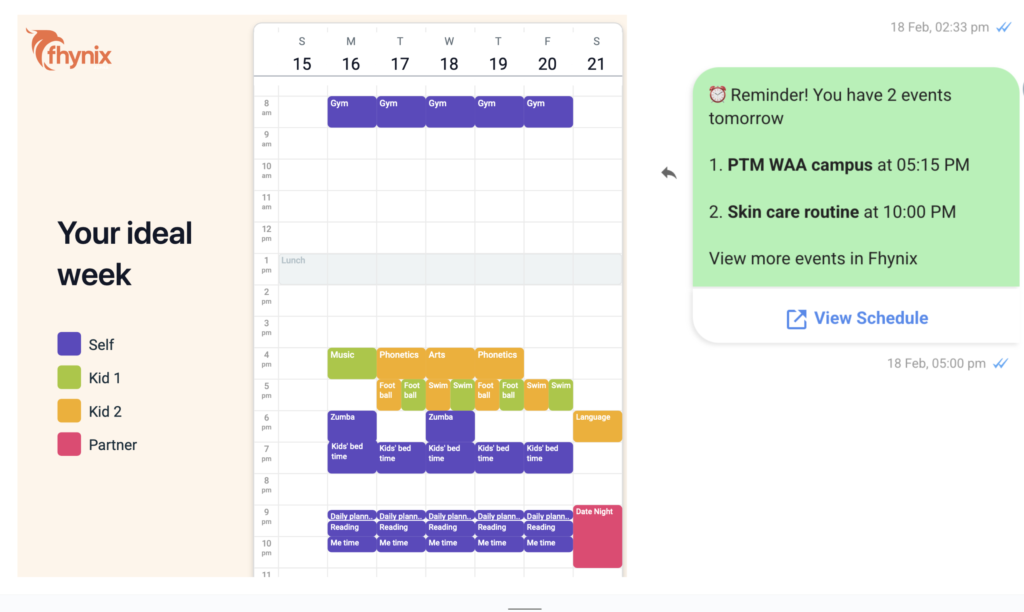
Fhynix represents the next evolution of productivity tools: an AI-powered daily planner designed to help you not just plan—but actually execute your day.
Unlike traditional apps that separate tasks, calendar, and reminders, Fhynix combines everything into a single intelligent system.
- AI-powered planning: Automatically structures your day based on priorities
- WhatsApp integration: Capture tasks and receive reminders where you already are
- Unified timeline: Tasks, events, and routines in one place
- Smart execution: Nudges and reminders to help you follow through
👉 If most AI tools help you think, Fhynix helps you act.
2. Notion AI
Notion AI transforms scattered notes into an organized digital workspace. It helps you create structured documents, summarize long pages, rewrite content, analyze ideas, and manage projects within a single system. The power of Notion lies in its ability to convert raw information into clean, actionable pages—making it ideal for creators, teams, and students who handle large volumes of notes. Instead of manually organizing everything, the AI does the heavy lifting and lets you focus on thinking, not sorting.
- What it is: Context-aware writing assistant embedded in Notion.
- Best for: Knowledge workers juggling notes, goals, and content in one space.
- Why better: Auto-generates summaries, tasks, and drafts inside your saved context. Supports 70+ SaaS integrations.
- Pricing: Free tier; AI features around $8–16/month.
- Competitors: Evernote AI, Obsidian AI.
3. Endel
- What it is: Personalized ambient soundscapes syncing to user context.
- Best for: Remote workers, parents, or dreamers needing focus or relaxation.
- Why better: Real-time, adaptive sound based on heart rate or weather.
- Pricing: ~$4.99/month or one-time purchase.
- Competitors: Brain.fm, Calm.
4. Photoshop Generative Fill
- What it is: AI-powered image editors embedded in the Adobe suite.
- Best for: Designers or content creators needing quick edits.
- Why better: Reduces manual editing time—boosts creative flow.
- Pricing: Adobe Creative Cloud plans.
- Competitors: Affinity Photo, GIMP (with plug-ins).
5. PDFgear AI
- What it is: PDFs with AI chatbots for interactive Q&A.
- Best for: Researchers, students, lawyers, and any one wrestling with long documents.
- Why better: Instant clarity, in-context answers—no page flipping.
- Pricing: Freemium with premium tiers.
- Competitors: Adobe Acrobat AI, Foxit AI.
6. Microsoft 365 Copilot
- What it is: AI assistant inside Outlook, Word, Excel, Teams.
- Best for: Office workers needing polished output fast.
- Why better: Deeply integrated with existing tools—AI that lives where you work.
- Pricing: Enterprise-level licensing.
- Competitors: Google Workspaces Smart Compose, Grammarly business.
7. Healthify Me
- What it is: AI-driven personal health coach for meals and fitness.
- Best for: Wellness seekers wanting customized plans that respect their pace.
- Why better: Adaptive and personalized, unlike one-size-fits-all diets.
- Pricing: Freemium + coaching tiers.
- Competitors: MyFitnessPal, Lifesum AI.
8. Wysa / Youper
- What they are: Emotional support chatbots with therapeutic style check-ins.
- Best for: Those seeking emotional routines: reflection, gratitude, mindfulness.
- Why better: Accessible, conversation-based mental wellness tools.
- Pricing: Freemium with additional content packs.
- Competitors: Woebot, Replika.
9. GitHub Copilot
- What it is: AI pair programmer integrated into developer workflows.
- Best for: Software devs wanting smarter, quicker code assistance and corporate use of AI is soaring
- Why better: Speeds up dev by 55.8%, according to experiments.
- Pricing: ~$10/month.
- Competitors: TabNine, Amazon CodeWhisperer.
10. Perplexity AI
- What it is: AI-powered conversational search with citations and AI assistant features.
- Best for: Students, professionals, researchers needing fast, reliable answers.
- Why better: Synthesizes web and documents with sources—smarter than traditional search.
- Pricing: Freemium; Pro tiers available.
- Competitors: ChatGPT Search, Claude.
11. Braina
- What it is: Voice command assistant for Windows with automation capabilities.
- Best for: Power users seeking hands-free productivity on their PC.
- Why better: Local and cloud AI for voice control, speech-to-text, automation, and image generation.
- Pricing: Braina Lite (free), Pro/Pro Ultra tiers.
- Competitors: Windows Cortana, Dragon NaturallySpeaking.
5 Podcasts to Get Started with AI Apps and Stay Ahead
Sometimes the best way to learn about AI apps isn’t through blogs or tutorials, but by listening to the people building, researching, and experimenting with them. Podcasts offer bite-sized, real-time insights on how AI is evolving. Here are 5 top picks:
Practical AI
- What it is: A podcast focused on making AI approachable and useful for everyone—from developers to everyday app users.
- Why it matters: Great for people who want hands-on, real-world applications of AI without drowning in jargon.
- Good episode to start with: “AI Agents and the Future of Productivity.”
The TWIML AI Podcast (This Week in Machine Learning & AI)
- What it is: Sam Charrington interviews AI innovators and digs into how AI is applied in business and research.
- Why it matters: Especially strong on use cases in health, finance, and productivity—great if you’re curious about where AI apps are headed.
- Good episode to start with: “AI in Everyday Workflows.”
The AI Podcast The AI Breakdown
- What it is: Daily news and analysis of the latest in AI, hosted by Nathaniel Whittemore.
- Why it matters: If you don’t have time for deep dives but want to stay up to speed on trends and controversies, this one is gold.
- Good episode to start with: “AI Apps That Are Changing How We Work in 2026.”
Exponential View with Azeem Azhar
Let AI handle the scheduling. You focus on life.
🧠 Natural language input – just type or speak
📲 WhatsApp reminders – AI meets you where you are
🔗 Syncs with Google/Outlook – zero setup friction
⚡ Smart conflict detection – prevents double‑booking
intelligence, simplified
10 Best AI Apps to Supercharge Your Life in 2026
- Fhynix – AI-powered daily planner with WhatsApp reminders and smart scheduling.
- Notion AI – AI workspace for writing, organizing, and managing knowledge.
- Endel – Personalized AI soundscapes for focus and relaxation.
- Photoshop Generative Fill – AI-powered image editing for fast creative workflows.
- PDFgear AI – AI-powered document reader with instant summaries and Q&A.
- Microsoft 365 Copilot – AI integrated into Word, Excel, Outlook, and Teams.
- HealthifyMe – AI health coach for nutrition and fitness tracking.
- Wysa / Youper – AI mental wellness apps for emotional support and reflection.
- GitHub Copilot – AI coding assistant for developers.
- Perplexity AI – AI-powered search engine with real-time answers and sources.
Frequently Asked Questions
What are the best AI apps in 2026?
The best AI apps in 2026 include Fhynix, Notion AI, Endel, Photoshop Generative Fill, PDFgear AI, Microsoft 365 Copilot, HealthifyMe, Wysa, Youper, GitHub Copilot, and Perplexity AI. These tools help improve productivity, focus, creativity, and daily planning.
Which AI app is best for productivity?
Fhynix is one of the best AI apps for productivity because it acts as an AI planner that organizes your tasks, schedules your day, and sends reminders via WhatsApp to improve execution.
What is an AI planner and how does it work?
An AI planner is a tool like Fhynix that uses artificial intelligence to organize tasks, prioritize work, and create a structured daily plan automatically, reducing decision fatigue.
Are AI apps better than traditional productivity tools?
AI apps are more effective than traditional tools because they actively help you plan, automate decisions, and execute tasks instead of just storing information.
Why are AI planners becoming important in 2026?
AI planners are becoming important because they reduce mental load, automate daily planning, and help users focus on execution instead of constantly deciding what to do next.